Magic Hour AI review 2026: features, pricing, pros and cons
Magic Hour AI puts Kling, Veo, Seedance, face swap and lip sync on one credit balance. We weigh the plans, the free tier and what users report.
 Written byDr. Alap ZahidReviews And Guides Editor
Why you can trust The AI Future
Our writers research every product, link each claim to its source and correct mistakes openly. Companies can't pay for coverage or see reviews before they're published.
Read our editorial policy
Our verdict on Magic Hour AI
Magic Hour AI is one of the most complete all-in-one AI media studios in late 2026, with many models, strong face and lip-sync tools, a real API and credits that never expire. Short-form creators, marketers and developers should try it; skip it if you need fine editing control or predictable per-video costs.
Pricing Free (limited); Creator $19/mo ($12/mo yearly); Pro $39/mo ($25/mo yearly); Business $99/mo ($66/mo yearly); credit packs from $10 for 4,000 credits
Visit Magic Hour AIMagic Hour AI is a browser-based studio that puts dozens of AI video, image and audio tools, plus third-party models like Kling, Veo and Seedance, behind one login and one credit balance. You can try it free without signing up, and paid plans start at $19 a month or $12 a month billed yearly. I think it's a good pick if you want lots of tools and models in one place, and probably a frustrating one if you hate counting credits.
Quick honesty note before we go further. Nobody on our team ran hands-on tests for this review, so I'm not going to tell you how long my clips took to render or show you screenshots I didn't take. Instead, we reviewed Magic Hour as it stands in late October 2026 using its official product, pricing and policy pages, other reviewers' write-ups and videos, and roughly 50 recent user reviews. Where someone else did the testing, I'll name them.
If you've been searching for "magichour ai" or "magic hour ai video", you're in the right place. Same product.
About Magic Hour AI
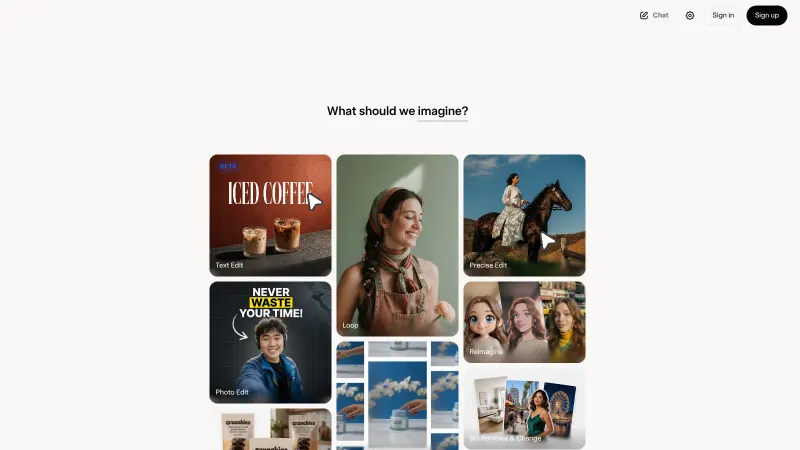
Magic Hour describes itself as "a browser-based platform and API for creating and transforming video, images, and audio, including face swap, lip sync, talking photos, and image editing", according to its About page. It was founded in 2023 by David Hu and Runbo Li, two childhood friends whose families both emigrated to Pennsylvania, and it went through Y Combinator's Winter 2024 batch.
The pitch is consolidation. Instead of paying for one app to generate clips, another to swap faces and a third for voiceovers, you get one studio and one wallet of credits. The homepage says it's trusted by 4.8M+ creators and offers more than 25,000 templates, while the About page puts the creator count at 4.9M+. Either way, it seems far from a tiny side project.
It's also more than a front end for other companies' models. Magic Hour has its own transformation tools (face swap, lip sync, talking photos, character replacement), and developers can call the same features through a REST API with SDKs for Python, Node, Go and Rust.
If you'd rather watch someone click through the interface first, this tutorial from AiMinds walks through making short AI videos with Magic Hour's free tools.
Key features
Image to video and text to video
This is the main event. You upload a photo (PNG, JPG, WEBP, HEIC and several other formats) or type a prompt, pick a model and an aspect ratio, and download an MP4. The image-to-video page lists the current lineup: LTX-2.5 on the free tier, and Seedance, Kling 2.6, Kling 3.0, MiniMax H3 and Veo 3.1 on paid plans. Newer options such as Kling 4.0, which Magic Hour says can make clips "up to 30 seconds" with image and video references, also appear on the same page.
Output options run from 480p to 1080p, with 4K on supported paid models, in 9:16, 16:9 or 1:1 depending on the model. Not every model supports every combination; Veo 3.1, for example, only does 9:16 and 16:9. The text-to-video tool works the same way, starting from a written scene instead of a photo. If you're new to writing those, our AI video prompt guide will save you some wasted credits.
Honestly, the appeal here is choice. If Kling's motion looks off, you can try Seedance or Veo on the same image without opening a new account. The catch is that choice is also confusing. One Trustpilot reviewer wrote that there are "plenty of models to choose, which confused me at first", and the company replied that it is working on automatic model routing.
Face swap, head swap and body swap
Face swap is the feature Magic Hour is best known for. The face swap page offers single and multiple face swaps for photos, videos and GIFs, plus head swap and body swap. Photo face swaps are free, need no sign-up and come without a watermark. Video face swap for guests is more limited: the company's own platform overview says you get three free guest swaps a day, up to ten seconds each, at 480p with a watermark.
A word on consent, because this matters more than any feature. Magic Hour's Terms of Service say you are "responsible for obtaining the rights and consents required by applicable law to use a person's image, voice, or likeness". They also ban impersonation and sexual or intimate content of a real person made without their consent. The site markets celebrity and movie-scene swaps, but using a real person's face to mislead people, or to make intimate images of them, is harmful and illegal in many places. Stick to your own face, people who have clearly agreed, or content you have the rights to.
Lip sync, talking photos and AI UGC
Lip sync takes a video and new audio and makes the mouth match. Talking photos do the same from a still image. Several users seem to like these tools for UGC-style ads (the "person talking to camera about a product" format). One long-time subscriber on Trustpilot praised the avatar and UGC creators but warned that "these features eat your credits FAST!" Keep that in mind before you plan a whole campaign around them.
Image generation and editing
Beyond video, there's an image generator, a prompt-based image editor, background removal, upscaling, headshots and a clothes changer. According to the pricing FAQ, many image tools give free users watermark-free outputs, though this varies by workflow. If image work is your main focus, compare it with the picks in our best AI image generators roundup.
Audio tools
Capterra's listing describes text-to-speech, voice changing, voice cloning and music generation. The free, no-sign-up music preview is limited: the company told one Trustpilot reviewer that guest tracks are currently 30 seconds long and that a free account allows longer outputs.
API and MCP for developers
Every paid plan includes full API access, according to the pricing page, and the same credit balance covers web and API use. Capterra's listing also mentions a hosted MCP server, so AI agents can call Magic Hour tools directly. A few Trustpilot reviewers who build apps singled this out as the reason they stayed.
Magic Hour AI pricing and plans
Magic Hour runs on credits. At the base rate, one frame of video costs one credit, and premium models and higher resolutions cost more. As a reference point, the company says a typical 5-second, 720p clip with Kling 2.6 uses 180 credits on paid plans (image-to-video FAQ). Here are the three main plans as listed on the official pricing page (checked October 2026):
| Plan | Monthly | Yearly (per month) | Credits | Key limits |
|---|---|---|---|---|
| Free | $0 | $0 | Guest allowances plus account starter credits | Watermarked 480p, 3-second clips on guest video tools |
| Creator | $19 | $12 ($144 billed yearly) | 12,000/month or 144,000/year | 1024px, 3 generations at once, 2GB uploads |
| Pro | $39 | $25 ($300 billed yearly) | 25,000/month or 300,000/year | 1472px, 5 generations at once, 5GB uploads |
| Business | $99 | $66 ($792 billed yearly) | 70,000/month or 840,000/year | 4K, unlimited concurrent generations, 10GB uploads |
All three paid plans include watermark-free exports, commercial use, a priority queue, priority support and access to all tools and models. You can also "customize credits": the page offers bigger tiers such as Pro Plus ($59, 40,000 credits) and Business Max ($249, 200,000 credits) a month.
If you don't want a subscription, one-time credit packs run from $10 for 4,000 credits up to $160 for 64,000. They come with watermark-free exports and commercial rights, but they don't include subscription-only settings such as higher resolutions and bigger uploads.
Two things I like here. First, unused credits never expire, including subscription, purchased and daily credits, even after you cancel, according to Magic Hour's overview. Second, the refund policy is written down: new subscriptions and renewals get a full refund within 7 days if you've used fewer than 400 credits since paying, limited to one approved refund per customer.
Is Magic Hour AI free? What the free plan really includes
Yes, but the free tier is layered, and that's where a lot of complaints come from. Here's how it breaks down:
- Guest use, no account: the video and audio tools share three free generation requests a day. Clips are 3 seconds with audio, export at 480p and carry a watermark. People on the same network share that allowance (Magic Hour FAQ).
- Free account: the pricing page only says free accounts "may receive starter credits" and ways to earn more. In replies on Trustpilot in October 2026, the company said the sign-up bonus was 400 credits and that users can claim 100 free credits a day.
- Models: free users get LTX-2.5. Kling, Veo and Seedance need a paid plan.
- Rights: without a paid plan or credit pack, you can use outputs for personal, non-commercial purposes only.
So the free tier is fine for poking around. It isn't enough to make a finished ad, and the 3-second guest clips confused at least one Trustpilot reviewer, who assumed that was the full tool.
Performance and independent testing
Since we didn't run our own tests, here's what other people found.
OutlierKit's review (pricing checked October 24, 2026) liked having several models in one interface and rated face animation and lip sync highly. It also flagged that generation times vary "(30s to several minutes)", that some models give inconsistent results and that the credit system can feel limiting for heavy users. Its bottom line: Magic Hour "doesn't lead the field on any single feature", but it saves you from juggling subscriptions. OutlierKit also reported a 4.9/5 rating on Product Hunt from 28 reviews, which we couldn't check directly because Product Hunt blocked our request.
eesel AI's review called the face swaps "eerily realistic" and saw the platform as best suited to social media managers, small businesses and agencies that need lots of visual content fast. Its pricing section looks out of date compared with the current pricing page, so I'd ignore those numbers.
On YouTube, LunaAi's video "I Tested Powerful AI Video Tools in ONE Platform — Magic Hour AI" (about 30,000 views in its first month) goes through the multi-tool workflow. We've listed it in the video reviews section of this page.
User reviews add some useful detail. On speed, one Trustpilot reviewer said image-to-video waiting times were "tooooo long". The company replied that Kling 2.6 and Wan 2.2 can take several minutes, while LTX-2.5 typically finishes short videos in about 30 seconds. On quality, the most common complaint is that you sometimes need several attempts to get a usable result, and every attempt costs credits. Magic Hour says failed jobs are refunded automatically but completed ones aren't, even if you don't download them.
Put together, the picture is consistent. Magic Hour's output quality is likely just the quality of whichever model you pick. What Magic Hour itself adds is the workflow around those models: templates, face and lip tools, upscaling and an API, all on one balance. If you're comparing raw model quality, our guides to using Kling AI and the Seedance tutorial cover two of the models Magic Hour offers.
Best suited to
- Social media creators and marketers who make lots of short clips, UGC-style ads and meme content and want several models without several subscriptions.
- Small teams and agencies that need volume. The Business plan's 4K exports and unlimited concurrent generations are the draw.
- Developers who want one API for many image and video models, with SDKs and an MCP server.
- Not for filmmakers who need fine timeline control. Magic Hour's own overview says its AI Video Editor isn't designed for "detailed timeline editing, keyframes or audio mixing".
- Not for people who want predictable monthly costs no matter how many retries they need.
Magic Hour AI alternatives worth considering
- Higgsfield AI: the closest rival, another multi-model studio aimed at creators, with lots of camera-motion presets. Read our Higgsfield AI review or the Higgsfield tutorial.
- HeyGen: a better fit if you mostly need scripted talking-head avatars and translations rather than generated scenes. See our HeyGen AI review.
- Kling directly: if you only want one model and use it heavily, going to the source can make more sense. Our Kling AI guide explains how.
For a wider view, our best AI video generators roundup and image to video AI list compare more options.
Verdict
Magic Hour AI earns a solid 4 out of 5 from me.
It's one of the most complete all-in-one AI media studios around in late 2026: lots of current models, strong face swap and lip sync tools, a real API, and credits that never expire. Pricing is clear and the refund policy is better than most.
Where it loses points is predictability. Credits disappear fast on premium models, retries cost money, and the free tier's layers confuse new users. Use it if you make lots of short-form content or need one API for many models. Skip it if you want a single best-in-class model, detailed editing control or a flat price per video.
FAQ
What is Magic Hour AI?
Magic Hour AI is a browser-based platform for generating and editing video, images and audio. It combines its own tools, such as face swap, lip sync and talking photos, with third-party models like Kling, Veo and Seedance, all paid for from one credit balance. It also offers an API. The company was founded in 2023 and is backed by Y Combinator.
Is Magic Hour AI free?
Partly. You can try many tools without an account, but guest video clips are 3 seconds, 480p and watermarked, with three free requests a day across video and audio tools. Free accounts get starter credits and daily credit claims. Premium models, watermark-free video and commercial use need a paid plan or a credit pack.
How much does Magic Hour AI cost?
As of October 2026, Creator costs $19 a month ($12 billed yearly), Pro costs $39 ($25 yearly) and Business costs $99 ($66 yearly). These include 12,000, 25,000 and 70,000 credits a month. One-time credit packs start at $10 for 4,000 credits, and unused credits never expire.
Is Magic Hour AI safe and legit?
Yes. It's a real Y Combinator-backed company, and its terms say it doesn't use your prompts, uploads or outputs to train AI models. Trustpilot shows 4.2 out of 5 from 54 reviews. Complaints mostly concern credits and free-tier limits, not security. You're responsible for getting consent before using anyone else's face or voice.
Can I use Magic Hour videos commercially?
Only with a paid subscription, a credit pack or a paid usage agreement. Free users may use outputs for personal, non-commercial purposes only. You own what you generate, subject to the terms, but outputs may not be unique or qualify for copyright. You also need the rights to any faces, voices or footage you upload.
Next steps
New to AI video? Start with our pillar guide on how to generate video with AI. Then compare workflows in the Higgsfield AI tutorial and how to use HeyGen.
What video reviewers say
— LunaAi
Videos load from YouTube only when you press play.
Ratings around the web
Ratings as of 5 Nov 2026. Scores change over time; follow the links for the latest.
What users are saying
We read about 50 Trustpilot reviews from March to October 2026 (almost all of the 54 on the page). Most praise the range of tools and models and the easy interface, but many of the positive reviews are invited, verified reviews posted in the last two weeks of October, so treat the split as optimistic. Negative reviews centre on credits, free-tier limits and slow or failed generations.
Common praise
- Lots of tools and models in one place
- Easy, clean interface
- Fast, personal replies from the founder and support
Common complaints
- Credits spent on retries and unwanted results
- Confusing free-tier limits and starter credits
- Slow generations or site problems on some tools
Based on: Trustpilot reviews of Magic Hour (page 1), Trustpilot reviews of Magic Hour (page 2), Trustpilot reviews of Magic Hour (page 3)
What we like
- Many current video models (Kling, Veo 3.1, Seedance, LTX-2.5) on one credit balance
- Strong face swap, lip sync and talking-photo tools alongside generation
- Unused credits never expire, even after you cancel
- Full API access, SDKs and an MCP server on every paid plan
- Clear written refund policy and fast founder replies to reviews
What could be better
- Premium models and retries burn credits quickly
- Layered free tier (3-second guest clips, starter credits) confuses new users
- Generation can take several minutes on some models
- Limited fine editing control compared with a timeline editor
Sources
- Pricing Plans for Creators and Teams (Magic Hour)
- Free Image to Video AI Generator Online (Magic Hour)
- Free Text to Video AI Generator Online (Magic Hour)
- AI Face Swap - Free Online (Magic Hour)
- Terms of Service (Magic Hour)
- What is Magic Hour AI? Tools, pricing & how to start (Magic Hour)
- About Magic Hour: Our Story & Mission (Magic Hour)
- AI Video Generator, Image Generator & Editor (Magic Hour)
- Magic Hour: AI media creation platform for creators and developers (Y Combinator)
- Magic Hour Software Pricing, Alternatives & More 2026 (Capterra)
- Magic Hour Reviews (Trustpilot)
- Magic Hour Reviews, page 2 (Trustpilot)
- Magic Hour Reviews, page 3 (Trustpilot)
- Magic Hour Review 2026: AI Video Creation Platform for Creators (OutlierKit)
- Magic Hour AI review 2026: Is it worth trying? (eesel AI)
- Create Viral AI Videos in Minutes (FREE Tool) | Magic Hour AI Full Tutorial (YouTube, AiMinds)
- I Tested Powerful AI Video Tools in ONE Platform — Magic Hour AI (YouTube, LunaAi)