Descript AI review 2026: features, pricing, free plan and limits
Descript AI lets you edit video and podcasts by editing a transcript. We weigh Underlord, Studio Sound, the plans and the AI credit catch.
 Written byDr. Alap ZahidReviews And Guides Editor
Why you can trust The AI Future
Our writers research every product, link each claim to its source and correct mistakes openly. Companies can't pay for coverage or see reviews before they're published.
Read our editorial policy
Our verdict on Descript
Descript is the easiest way to edit spoken-word video and podcasts, and Hobbyist covers a weekly show for $16 a month billed annually. Use it if your content is mostly people talking; skip it, or start monthly, if you plan to hand most editing to its AI agent or need polished avatars.
Pricing Free; Hobbyist $16/mo annual ($24 monthly); Creator $24/mo annual ($35 monthly); Business $50/mo annual ($65 monthly); Enterprise custom. Prices per person.
Visit DescriptDescript AI is a video and podcast editor that lets you edit a recording by editing its transcript: delete a sentence in the text and the matching audio and video disappear. On top of that it adds an AI co-editor called Underlord, Studio Sound audio cleanup, voice cloning, avatars and AI video generation. There's a free plan, and paid plans start at $16 per person per month billed annually, as of late October 2026.
The trade-off is just as clear. The text-based editing is fast and easy to learn, and honestly, it's the best thing here. But you pay on two separate meters (media hours and AI credits), and recent user reviews complain about bugs and credits that run out faster than expected. Nobody on our team ran a hands-on test for this review. We built it from Descript's official pricing and help pages, published independent reviews and a few dozen user reviews on Capterra and Trustpilot, all checked in late October 2026. Where someone else did the testing, we say who.
If you'd rather watch the basics first, Descript's own beginner walkthrough covers getting a project set up and editing through the transcript.
Descript AI in brief
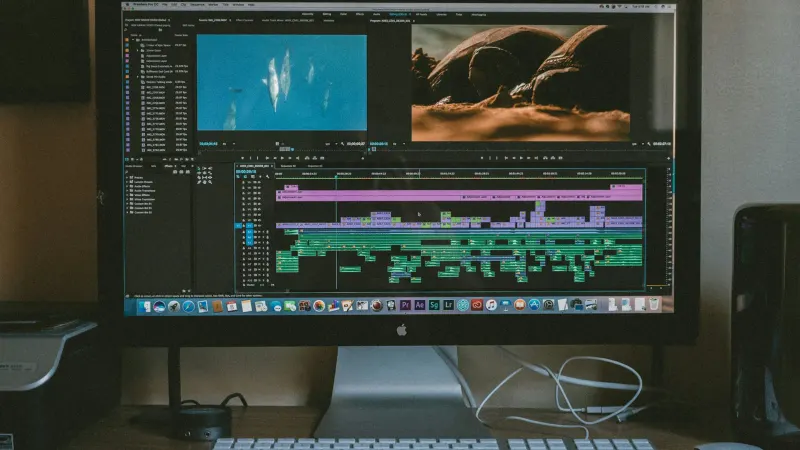
Descript works like a word processor wired to a video timeline. You upload or record media, Descript transcribes it, and every word is time-stamped to its place in the recording. Cut text, and you cut footage. Move a paragraph, and the clip moves with it. Sonix describes it as a desktop app for macOS and Windows, founded in 2017 by Andrew Mason, and notes that transcription is the mechanism for editing rather than the end product.
Over the past two years the AI layer has grown much bigger than the editor it started as, which I think is a mixed blessing. Descript's own Underlord primer calls the new Underlord "an AI agent built into a fully powered video editor" that can run "entire editing workflows" such as a rough cut, B-roll and effects from a single prompt. The company's AI video page adds generated B-roll and scenes, avatars, voice clones, dubbing and a Regenerate feature that fixes a misspoken word by cloning your voice and adjusting your mouth movement. Descript says more than 6 million creators and teams use it.
So when people search for "Descript AI video editor", they usually mean this combined package: a transcript-first editor plus a growing set of AI tools that draw from a monthly credit allowance.
Key features
Text-based editing
This is still the core, and it's probably the reason most people sign up. On the plans page you'll see transcription in 25 languages, detection of 8+ speakers and multitrack transcription on every plan. Editing tools such as Remove Filler Words and Shorten Word Gaps sweep a whole recording in one pass. A Capterra reviewer, an e-learning coach, wrote that removing "words and chunks from the transcript is superb - it really makes editing a breeze for a complete amateur" (Capterra).
Accuracy matters here, because every transcript error becomes an editing error. Sonix, a competing transcription vendor, puts Descript's accuracy at roughly 92 to 95% for clean single-speaker English, falling to around 80% with three or more speakers or heavy crosstalk. Treat that as a competitor's estimate, not a lab result, but the direction is what you'd expect from any speech-to-text system.
Underlord, the AI co-editor
Underlord works on the transcript, not the timeline, which seems a sensible design. You describe the result you want, and it applies Descript's own tools: filler removal, multicam, chapters, clips, Studio Sound, Eye Contact, B-roll. Descript's guidance is to give it detail, for example "make this a fast-paced highlight reel for TikTok with a humorous tone, that's less than 60 seconds" instead of "cut this down" (Descript blog). One podcaster quoted in the same post says his saved prompt "does about 90% of the work for me".
The free plan gets limited Underlord access; Hobbyist and up include it, with Creator getting "full access", going by the pricing page. Every Underlord action spends AI credits.
Studio Sound, Eye Contact and Green Screen
Studio Sound removes background noise and room echo with one click. Eye Contact nudges your gaze toward the lens when you read from a script, and Green Screen removes the background without a physical screen. All three are AI credit features, per Descript's pricing FAQ. Sonix estimates Studio Sound uses about 10 credits per application, which is the one per-action cost most third-party writers can point to.
AI speech, voice clones and Regenerate
Paid plans include text-to-speech, custom voice clones and Regenerate (pricing page). The practical use is fixing a flubbed word without re-recording. Sonix cites Descript's Help Center for the figure that a voice model can be created from as little as 30 seconds of audio. Only clone voices you own or have written permission to use. If voiceovers are your main need, our guide on how to add AI voice in video walks through the workflow, and our AI voice generator roundup compares dedicated tools.
AI video, avatars, translation and dubbing
Descript now generates images and video inside the editor. Its AI page names Google's Veo 3.1 for video and Nano Banana among its image models, and lets you choose a model when you need control. Business adds translation and dubbing "in 30+ languages with proofread" and custom avatars from a photo or text prompt (pricing page). Avatars are the weakest part in user reviews, and I wouldn't buy Descript for them. A Capterra reviewer wrote that "AI Avatar generation is pretty bad" compared with the AI voices (Capterra). If avatars are the job, a dedicated tool like HeyGen (see our HeyGen review) is likely the safer bet.
Recording, collaboration and exports
Descript includes remote recording rooms with up to 10 participants, screen recording, comments and live collaboration. Timeline export to Premiere, Final Cut Pro, Pro Tools, Audition and Reaper means you can do the rough cut in Descript and finish elsewhere (pricing page).
For a longer independent walkthrough of these features, this 2026 tutorial from Metics Media goes from setup to advanced editing.
Descript pricing and plans
Descript's official pricing page shows annual prices per person, with the annual plan "saving up to 35% over monthly plan". Monthly prices below come from Castmagic's snapshot of the same page (verified August 20, 2026). Checked October 2026.
| Plan | Annual (per month) | Monthly | Media hours | AI credits | Export | Seats |
|---|---|---|---|---|---|---|
| Free | $0 | $0 | 1 hr/month | 100 one-time | 720p, watermark | 1 |
| Hobbyist | $16 | $24 | 10 hrs/month | 400/month | 1080p | 1 |
| Creator | $24 | $35 | 30 hrs/month | 800/month | 4K | 1–3 |
| Business | $50 | $65 | 40 hrs/month | 1,500/month | 4K | Up to 5 |
| Enterprise | Custom | Custom | Custom | Custom | 4K | Custom |
The free plan
The free plan needs no credit card. It gives you 60 media minutes a month, 100 AI credits that are one-time rather than monthly, 720p exports, 5 GB of storage, 2 hours of remote recording and 1 GB file uploads (pricing page). The free plan's watermark and 720p cap make it a trial, not a publishing tool. As Castmagic points out, a single 45-minute episode uses most of the monthly allowance.
The two meters
Media hours count every file you upload or record, "regardless of whether they're transcribed", and AI credits count Underlord, Studio Sound, Green Screen, Eye Contact and generated media (pricing FAQ). A developer who modelled the plans in Python on DEV Community flags two traps: neither meter rolls over, and media minutes are spent on upload, so importing three hours of B-roll you barely use still costs three hours. Paid plans can buy top-ups; the free plan can't.
A worked example
Say you publish a weekly 45-minute podcast. Four episodes a month is 180 minutes. Add 20% for retakes and you upload about 216 minutes, roughly 3.6 of Hobbyist's 10 media hours. At Sonix's estimate of 10 credits per Studio Sound pass, one pass per episode is 40 of your 400 credits. That leaves plenty of room for filler removal and clips.
Now say you make three YouTube videos a week from 40 minutes of raw footage each, plus about 5 hours of B-roll imports a month. That's 12 × 40 = 480 minutes plus 300 = 780 minutes, or 13 hours. That's over Hobbyist's 10 hours, so you're on Creator. And if you lean on Underlord or generated video, the credit meter, not the hours, is the one most likely to run out. Descript doesn't publish a per-action price list for most AI features, so watch your balance for the first month before committing to annual billing.
Performance and independent testing
Independent testing of Descript's newest AI features is thin, so we've kept to what we could verify and who it comes from.
- Editing speed: this is the most consistent praise. An e-learning coach on Capterra said she was "very impressed with the speed and efficiency of Descript for editing" 15 to 45 minute training videos, and older reviews describe workflows roughly twice as fast (Capterra page 2).
- Transcription: about 92 to 95% on clean single-speaker English and about 80% on messy multi-speaker audio, per Sonix's review, a competitor.
- Underlord: Descript itself says the agent "can misunderstand or misinterpret what you tell it" and recommends iterating and asking it to check its own work (Descript blog). User reviews are split: some praise saved workflows, others report a lot of correcting.
- Reliability: Trustpilot's AI summary of 90 recent reviews says users "frequently encounter frustrating software bugs, lagging desktop applications, and unexpected system errors" (Trustpilot). A team on Capterra reported months-old edits apparently lost from projects (Capterra).
The limits
- Heavy AI use on a small plan. Credits don't roll over, and generations that fail can still cost you, according to several reviews. One October 2026 Trustpilot reviewer estimated AI editing could cost "$200-$400 to edit a video" (Trustpilot). That's one user's figure, but it shows how fast an agent-driven workflow can burn credits.
- Crosstalk and many speakers. Lower transcript accuracy means more manual fixes before text editing works cleanly.
- High-end finishing. Descript isn't built for colour grading or complex effects. Use timeline export to Premiere or Final Cut for the last mile.
- Avatars. Reviewers rate them well below the voice tools.
- Plan changes. Several long-time Trustpilot users in 2026 complain about subscription rule changes that cut how many videos they can make for the same price (Trustpilot).
Who Descript is for
| If you… | Descript fit | Plan to start with |
|---|---|---|
| Edit interview podcasts or talking-head video | Strong | Hobbyist |
| Make training videos and screen recordings | Strong | Hobbyist or Creator |
| Publish several YouTube videos a week with B-roll | Good, watch media hours | Creator |
| Want an AI agent to do most of the editing | Mixed, budget for credits | Creator, monthly first |
| Need avatars or dubbing at scale | Weak to mixed | Business, or a dedicated tool |
| Do cinematic editing, grading or VFX | Poor | Use a traditional editor |
If you're new to AI-assisted editing generally, our step-by-step guide on how to AI edit a video covers the workflow across tools, and our pillar guide on how to make AI videos explains where generation fits in.
Descript AI alternatives worth considering
- Riverside: choose it if remote recording quality is your priority. Castmagic lists its Pro plan at $24/month billed annually as of August 2026. Our Riverside AI review covers it in detail.
- CapCut: choose it for short-form social video with templates and effects rather than transcript editing. See our CapCut AI video maker guide.
- Adobe Podcast: choose it if you mainly need speech cleanup and simple recording, not a full editor. Read our Adobe Podcast AI review.
For fully generated video rather than editing your own footage, start with our best AI video generators roundup.
Verdict
I think Descript is still the easiest way to edit spoken-word video and podcasts, because editing a transcript is faster than scrubbing a timeline and the learning curve is short. Studio Sound, filler removal and voice fixes save real time, and the Hobbyist plan at $16 a month (annual) covers a weekly show comfortably.
The AI agent and generation features are where it gets less predictable, and I'd treat them as extras for now. Credits are a second budget you need to watch, reliability complaints are common in 2026 reviews, and avatars lag behind specialist tools. I'd use Descript if your content is mostly people talking. Skip it, or start on monthly billing, if you plan to hand most of the editing to Underlord or need polished avatars.
Next steps
- Learn the general workflow in how to AI edit a video.
- Add narration with how to add AI voice in video.
- Compare avatar tools in our HeyGen tutorial.
FAQ
Is Descript AI free?
Yes, there's a free plan with no credit card required. It includes 60 media minutes per month, 100 one-time AI credits, 720p exports with a watermark and 5 GB of storage. That's enough to learn the editor and try Studio Sound, but you need Hobbyist ($16/month annual) for watermark-free 1080p exports.
What is Underlord in Descript?
Underlord is Descript's AI co-editor. You describe what you want in plain language, and it uses Descript's tools to make a rough cut, remove filler words, add chapters, B-roll, captions or effects, or cut social clips. Each action uses AI credits, and Descript advises specific prompts and checking its work.
Is Descript good for podcasts?
For most spoken-word podcasts, yes. Text-based editing, filler-word removal, Studio Sound and remote recording rooms cover the core workflow, and you can export the timeline to Pro Tools, Audition or Reaper for final mixing. Multi-speaker crosstalk lowers transcript accuracy, so expect more manual fixes on busy panel shows.
How do Descript AI credits work?
AI credits are separate from media hours. Credits pay for AI features such as Underlord, Studio Sound, Eye Contact, Green Screen, voices and generated media. Hobbyist gets 400 a month, Creator 800 and Business 1,500. Credits don't roll over, and paid plans can buy top-ups when they run out.
Can Descript clone my voice?
Yes. Paid plans include custom voice clones, text-to-speech and Regenerate, which lets you type a correction and have it spoken in your voice with matching mouth movement. Use it only for your own voice or with clear written consent from the speaker.
Is Descript safe for business content?
Descript says it's SOC 2 Type II compliant, and Enterprise adds SSO, SCIM, audit logs, training opt-out and custom data retention. Sonix notes that Descript doesn't publish HIPAA documentation, so regulated teams should confirm requirements with Descript's sales team before uploading sensitive recordings.
What video reviewers say
Videos load from YouTube only when you press play.
Ratings around the web
Ratings as of 6 Nov 2026. Scores change over time; follow the links for the latest.
What users are saying
We read about 50 user reviews: roughly 40 on two Capterra pages (spanning 2021 to 2026) and the most recent Trustpilot reviews, plus Trustpilot's AI summary of 90 recent reviews. Older Capterra reviews are overwhelmingly positive about text-based editing, while 2025 and 2026 reviews on both sites skew negative, citing bugs, credit costs and plan changes, so recent sentiment is worse than this overall split suggests.
Common praise
- Editing video by editing text is fast and beginner-friendly
- Filler-word removal and Studio Sound save hours per episode
- Easy collaboration with clients and co-editors
Common complaints
- Bugs, lag, crashes and occasionally lost edits
- AI credits used up quickly, including on failed generations
- Subscription changes and refund disputes
Based on: Capterra reviews of Descript, Capterra reviews of Descript (page 2), Trustpilot reviews of Descript
What we like
- Text-based editing makes cutting podcasts and talking-head video fast and easy to learn
- Studio Sound, filler-word removal and Eye Contact handle common cleanup in one click
- Underlord can run multi-step edits from a plain-language prompt
- Voice clones and Regenerate fix flubbed words without re-recording
- Timeline export to Premiere, Final Cut, Pro Tools, Audition and Reaper
What could be better
- Two separate meters (media hours and AI credits), neither of which rolls over
- Frequent 2026 user complaints about bugs, lag and lost edits
- Heavy Underlord or AI generation use can burn through credits quickly
- AI avatars rated well below the voice tools by reviewers
Sources
- Descript Pricing | Plans for Every Creator, Free to Start (Descript)
- AI Video Maker | Create & Edit Video With AI (Descript)
- How to Get Started With Underlord: A Primer (Descript)
- Descript Pricing 2026: Plans, Free Plan Limits & Is It Worth It (Castmagic)
- Descript Review 2026: Pricing, Accuracy, and Who It's Best For (Sonix)
- Descript bills you on two meters at once. I modeled it in Python (DEV Community)
- Descript Reviews 2026 (Capterra)
- Descript Reviews 2026, page 2 (Capterra)
- descript Reviews (Trustpilot)
- Descript for Beginners (YouTube, Descript)
- Complete Descript Tutorial 2026: Zero to Expert (YouTube, Metics Media)