7 best AI photo retouching tools in 2026, compared side by side
The best AI photo retouching tools for portraits, selfies and product shots in 2026, from Lightroom and Evoto to Picsart, with prices checked.
 Written byMuhammad Usman SiddiquiFounder and editor-in-chief
Why you can trust The AI Future
Our writers research every product from its official pages, independent tests and user reports, link each claim to its source and correct mistakes openly. Unless an article says otherwise, we haven't tested the product hands-on ourselves. Companies can't pay for coverage or see reviews before they're published.
Read our editorial policy
Short answer: if you retouch portraits for a living, the best AI photo retouching setup in 2026 is probably Adobe Lightroom for the bulk of a shoot plus Evoto or Retouch4me for skin. If you just want a cleaner selfie or product shot, Picsart and Photoroom do the job on a phone for about $10 a month or less. Photoshop is still the tool for the hard 5% of edits.
I've picked seven tools here, and each one has a clear job. They aren't interchangeable. A wedding photographer with 900 frames and a reseller with 30 sneaker photos need very different things, so I've labelled each pick with who it's for and what it costs, with prices checked in October 2026.
Key takeaways
- Lightroom and Photoshop cover most retouching jobs, and Adobe's Photography plan bundles both for $19.99 a month on an annual contract.
- Evoto and Retouch4me are specialists for skin, eyes and teeth that keep texture instead of blurring it, which is what clients notice first.
- Luminar Neo is the main option if you want to pay once rather than subscribe, starting at $99.
- Free AI photo retouch online tools exist, but they usually limit credits, export size or batch edits.
- If a retouched photo of a person is used in an ad, Norway and the UK both have rules on disclosure or misleading filters.
Our ranking method
Nobody at The AI Future ran hands-on tests for this roundup. We compared each tool using vendor pages, pricing records, independent reviews and user ratings on Trustpilot, as of late October 2026, and ranked them on six criteria:
- Natural results, judged from published reviews: does skin keep its texture, or does it look airbrushed?
- Control, meaning how easily you can dial an edit back or mask it off a mole or freckle.
- Batch speed for people who retouch hundreds of frames a week.
- Platform fit (desktop plug-in, standalone app, web or phone).
- Pricing model and total cost for a year of normal use.
- Independent feedback from reviewers and ratings sites, with the caveats those sites carry.
Prices are in US dollars and can change by country and promotion. Several vendors were running Halloween discounts when we checked, so I'd treat sale prices as temporary.
The 7 best AI photo retouching tools at a glance
| # | Tool | Category | Best for | Free tier | Starts at |
|---|---|---|---|---|---|
| 1 | Adobe Lightroom | Photo editor | Editing whole shoots | Yes (limited) | $11.99/mo |
| 2 | Adobe Photoshop | Pro image editor | Detailed, high-end retouching | No | $19.99/mo |
| 3 | Evoto | Portrait retouching app | High-volume portrait work | No | $80/yr |
| 4 | Retouch4me | Retouching plug-ins | Natural skin in Photoshop | Yes (limited) | $169/yr |
| 5 | Luminar Neo | Desktop and mobile editor | One-time purchase | No | $99 one-time |
| 6 | Picsart | Mobile and web editor | Quick selfie touch-ups | Yes (limited) | $10.50/mo |
| 7 | Photoroom | Product photo editor | Product photo retouching | Yes (limited) | $7.50/mo |
The best AI photo retouching tools in 2026, ranked
Adobe Lightroom – best for editing whole shoots
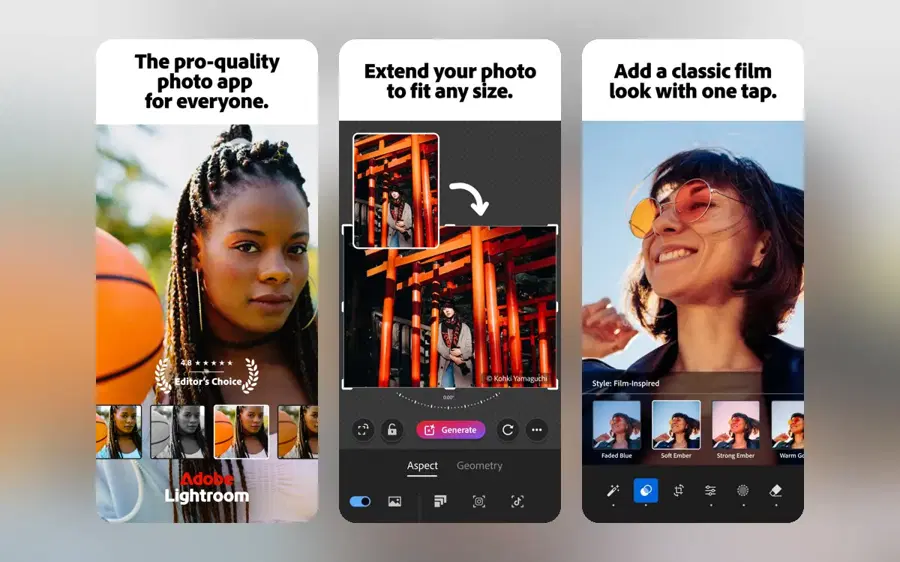
Adobe Lightroom is Adobe's photo organiser and editor, with AI masking, people removal and culling built in, on desktop, web and phone.
Strengths
Lightroom's main appeal is that most retouching happens inside the same app you already sort and grade in. Adobe added Distraction Removal for unwanted people to Lightroom and Camera Raw in February 2025, and Shotkit walks through how it detects people, lets you deselect the ones you want to keep and fills the gap. In June 2026, PetaPixel reported that Assisted Culling can now check each person in a frame for open, sharp eyes and suggest the strongest shot from a group.
TechRadar's Lightroom Classic review gave the interface high marks but flagged a real retouching risk: when the reviewer asked the AI to colourise an old family photo, it "changed my brother's face". That's worth remembering for client portraits. I'd keep generative tools away from faces unless you check the result at 100%.
Key features
- Distraction Removal finds and removes people and window reflections.
- Generative Remove erases larger objects and fills the gap.
- Assisted Culling flags closed eyes and groups similar frames.
- AI Sharpen can use Topaz Labs' Noise-Aware Sharpen model.
- Quick Actions and Adaptive Presets on mobile handle one-tap fixes.
Pros
- Edits sync across a full shoot
- Free mobile app with in-app purchases
- Retouching and grading in one place
Cons
- Generative edits use credits that don't roll over
- Plans are annual contracts billed monthly
- Less precise than Photoshop for detailed skin work
Adobe Lightroom pricing: Free mobile app with in-app purchases, then the Lightroom plan from $11.99/month; the Photography plan with Photoshop is $19.99/month, per Toolradar (checked October 2026). See pricing
Related: Best AI object removers Best AI picture editing tools
Verdict: start here if you shoot people in volume and already pay Adobe.
Adobe Photoshop – best for detailed, high-end retouching
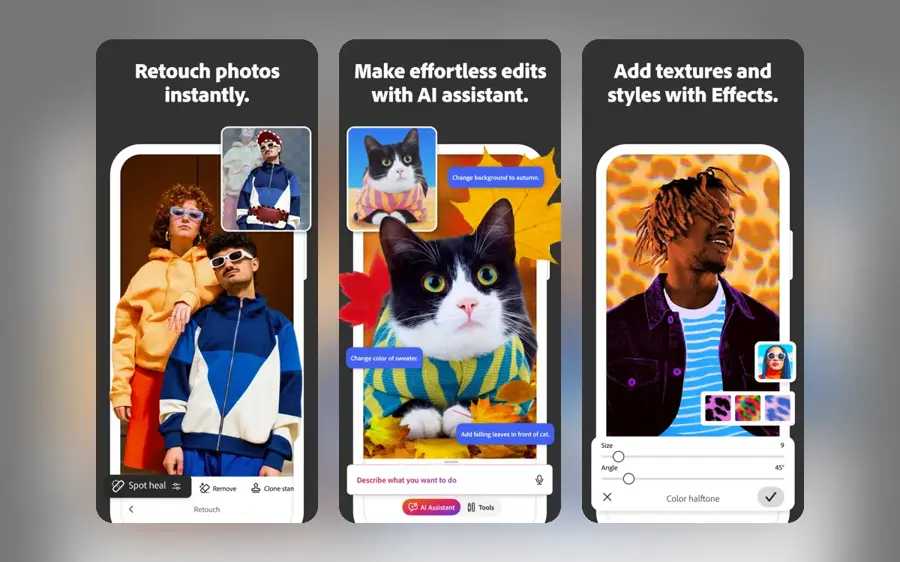
Adobe Photoshop is the layer-based editor most professional retouchers still finish in, now with Generative Fill, an AI Assistant and partner AI models.
Strengths
For fine retouching (stray hairs, fabric, compositing a head swap from the same shoot) nothing on this list gives you as much control. At Adobe MAX 2025, Engadget reported that Generative Fill gained partner models including Google's Gemini 2.5 Flash and Black Forest Labs' FLUX.1 Kontext, plus Harmonize, which matches the light and colour of a pasted subject to its new background. Generative Upscale uses Topaz Labs' AI to take small crops to 4K.
The new AI Assistant lets you type requests like "remove distractions" and then switch back to sliders. eWeek notes it can also walk you through an edit step by step rather than just doing it, which I think is the better mode if you're still learning. Our guide on how to use Photoshop AI covers the basics.
Key features
- Generative Fill with Adobe Firefly and partner models.
- Harmonize matches light and tone in composites.
- Generative Upscale takes low-resolution images to 4K.
- AI Assistant accepts typed or spoken edit requests.
- Full layers and masks so every AI edit stays reversible.
Pros
- The most control of any tool here
- Photography plan also includes Lightroom
- Works with Retouch4me and Luminar plug-ins
Cons
- No free plan
- Standalone plan includes only 25 generative credits a month
- Steep learning curve for beginners
Adobe Photoshop pricing: No free plan; the Photography plan (Photoshop plus Lightroom, 1,000 generative credits) is $19.99/month and Photoshop alone is $22.99/month, both annual and billed monthly, per Comparedge (checked October 2026)
Related: How to use Photoshop AI
Verdict: buy the Photography plan, not standalone Photoshop. It's cheaper and has 40 times the credits.
Evoto – best for high-volume portrait work
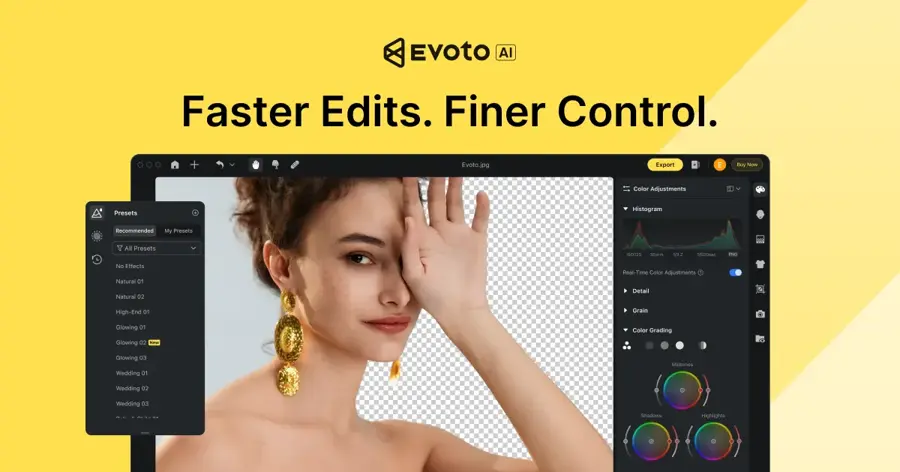
Evoto is a desktop, iPad and mobile app built for portrait, wedding and headshot photographers, with per-face AI retouching and batch syncing.
Strengths
Evoto retouches each face separately rather than applying one global filter, and on its homepage the company says it smooths skin and removes blemishes while keeping texture. It also does culling, tethered shooting and batch sync, so one edit can be copied across a full gallery. Evoto claims more than 1.2 million photographers use it, which I can't verify independently.
User feedback is split. On Trustpilot Evoto scores 3.6 from 371 reviews, and Trustpilot notes the company hasn't invited reviews recently. One wedding photographer wrote: "I can now edit wedding and newborn galleries in literally moments." A trial user in September 2026 had the opposite reaction: "I find Evoto very hard to use. It's not as user friendly as advertised."
Key features
- Per-face skin, blemish and shine retouching.
- Background, clothing and accessory adjustments.
- Basic colour, cropping and tethered shooting don't use credits.
- Runs on macOS, Windows, iPad and phone.
- Unused subscription credits roll over if you renew.
Pros
- Built around portrait sessions
- About $0.10 a photo on the Starter plan
- 7-day trial with 50 free credits
Cons
- No ongoing free plan
- Credits make heavy months harder to budget
- Mixed Trustpilot feedback on ease of use
Evoto pricing: No free plan (7-day trial); Starter is $80/year for 800 credits, listed at $89 before the current discount, with most AI edits costing about 1 credit per photo (checked October 2026). See pricing
Related: Best AI generated headshots
Verdict: probably the best value for photographers delivering hundreds of portraits a month.
Retouch4me – best for natural skin in Photoshop
Retouch4me sells single-purpose AI plug-ins (Heal, Dodge & Burn, Eye Vessels, White Teeth and more) that run inside Photoshop, Lightroom and other editors or as standalone apps.
Strengths
The pitch is that you buy only the fixes you need. Digital Photography School's Retouch4me review was most impressed by Heal, saying "The plugin removes blemishes but leaves skin texture and skin imperfections intact", and the reviewer could brush back moles and other features he wanted to keep. Shotkit also rated skin results highly and liked that you don't have to buy the whole bundle.
On Trustpilot it scores 4.8 from 611 reviews, the highest of anything here. The catch is cost if you want everything: a 2026 review on O Creatives says building a full plug-in collection gets expensive for freelancers. Honestly, I'd start with Heal alone and see if you miss the rest.
Key features
- Heal removes spots and blemishes while keeping skin texture.
- Dodge & Burn evens lighting and minor wrinkles.
- Eye Vessels and White Teeth handle eyes and smiles.
- Works in Photoshop, Lightroom, Capture One, Affinity Photo and video editors.
- Two free plug-ins: Frequency Separation and Color Match Free.
Pros
- Strong independent reviews for skin
- Perpetual licences work offline
- Opacity sliders make edits easy to soften
Cons
- A full set gets expensive
- Benefits from a powerful computer
- Cancelling a subscription forfeits unused credits
Retouch4me pricing: Free plug-ins, then yearly plans from $169 (1 retouch = 1 credit) or one-time plug-in licences; a 30% Halloween sale was running when we checked (checked October 2026). See pricing
Related: Best AI image enlargers
Verdict: my pick for retouchers who want Photoshop control with less brushwork.
Luminar Neo – best for a one-time purchase
Luminar Neo is Skylum's AI photo editor for desktop and mobile (now sold simply as Luminar), with skin smoothing, portrait relighting and generative tools, and it also works as a Photoshop or Lightroom plug-in.
Strengths
Luminar's main draw is the licence. On the plans page, the Desktop Only licence is $99 once, All Platforms is $139 and Max is $159. Its portrait tools cover skin smoothing and face lighting, and the app runs as a plug-in for Photoshop, Lightroom and Apple Photos.
Ratings are strong: 4.6 from 7,097 reviews on Trustpilot. One September 2026 reviewer switched from Lightroom and Photoshop and was happy, though they added that "Multiple masking needs eventually a little bit improvement." The fine print matters. Generative tools, Restoration and the AI Assistant only come with one year of access, after which you need a Luminar Prime subscription.
Key features
- Skin smoothing and face lighting tools for portraits.
- GenErase, GenSwap and GenExpand generative edits.
- Cross-device editing between phone and desktop.
- Plug-in for Photoshop, Lightroom and Apple Photos.
- Layers and masking for local edits.
Pros
- No ongoing subscription required
- 30-day money-back guarantee
- Easier than Photoshop for beginners
Cons
- Generative tools stop after a year unless you pay for Prime
- Big upgrades may cost extra
- Advertised discounts are against inflated list prices
Luminar Neo pricing: No free plan (30-day money-back guarantee); Desktop Only licence $99 one-time, All Platforms $139 (checked October 2026). See pricing
Related: Best AI picture editing tools
Verdict: a fair choice if you hate subscriptions and mostly need everyday portrait fixes.
Picsart – best for quick selfie touch-ups
Picsart is a mobile and web editor whose AI Retouch tool does one-tap skin, face and makeup edits, alongside object removal and templates.

Strengths
For a fast AI photo retouch online, free to start, Picsart is the easiest option here. AI Retouch groups its presets into five categories (Fun, Looks, Skin, Face and Makeup), with a blemish remover, wrinkle remover and eye bag remover in the Skin set. Style Factory's Picsart review says the app has "very capable face retouching tools, especially on mobile", but also lists slower customer support as a con.
I'm less keen on the Face presets. They include nose slimming, fuller lips and a "face lift" effect, and those cross from retouching into reshaping someone's face. Fine for a joke post. I'd skip them for anything a client or employer will see.
Key features
- One-tap skin presets for blemishes, wrinkles and redness.
- Virtual makeup looks.
- Object Remover and Background Remover.
- Batch Editor for up to 50 images on paid plans.
- Apps for iPhone, Android and the web.
Pros
- Free to download and try
- Very fast for social posts
- Cheap Pro plan
Cons
- AI features use credits
- Presets can look overdone
- Support slower than some rivals, per Style Factory
Picsart pricing: Free, then Pro from $10.50/month billed yearly ($15 list) and Ultra from $60/month billed yearly (checked October 2026). See pricing
Related: Best AI object removers
Verdict: good for your own selfies and social content, not for paid portrait work.
Photoroom – best for product photo retouching
Photoroom is an AI photo app for online sellers that cleans up product shots: backgrounds, wrinkles, stray objects and colour, in batches.
Strengths
Retouching isn't only about faces. If you sell clothes or homeware, Photoroom handles the dull fixes: its App Store listing mentions removing wrinkles with Ironing, recolouring products without a reshoot and batch editing hundreds of photos, with exports sized for Shopify, Amazon, Etsy and Vinted. Photoroom says it has over 300 million users.
Its Trustpilot score is the weakest here at 2.2 from 275 reviews. Complaints centre on changes to plans and batch limits; one September 2026 reviewer said "recently developers have made awful changes to the batch editing workspace". CostBench also warns that AI credits are charged for unusable generations.
Key features
- Background removal and AI backgrounds.
- Ironing removes wrinkles from clothing shots.
- Recolour products without reshooting.
- Batch editing with 500 batch exports a month on Pro.
- Shopify listing tools.
Pros
- Cheapest paid plan on this list
- Built for marketplace listings
- 7-day free trial of Pro
Cons
- Not designed for portrait retouching
- Poor Trustpilot rating after plan changes
- Credits spent on failed generations
Photoroom pricing: Free plan, then Pro from $7.50/month billed yearly ($89.99/year) or $12.99 month to month, per CostBench (checked October 2026). Prices and credits vary by country. See pricing
Related: Best AI photoshoot tools
Verdict: worth it for sellers; skip it if your subjects are people.
Choosing the right AI photo retouching tools
Match the tool to your volume
If you edit ten photos a month, a free phone app is plenty. Hundreds a week is different, and that's where Evoto's per-photo credits or Retouch4me's batch plug-ins pay for themselves. Lightroom sits in between.
Protect skin texture first
Plastic-looking skin is the most common complaint about automatic retouching, and it's why reviewers single out tools that leave pores visible. Both Digital Photography School and Evoto's own marketing put texture first. Whatever you pick, look for a strength slider and a way to paint edits off moles, scars or freckles the person wants to keep.
Check where your edits run
Plug-ins like Retouch4me and Luminar keep you in Photoshop or Lightroom, so your layers survive. Standalone apps such as Evoto and Picsart mean exporting and re-importing. That sounds minor until you're doing it for 400 files.
Budget for credits, not just the plan
Nearly every tool here meters AI edits. Adobe's standalone Photoshop plan includes only 25 generative credits a month against 1,000 on the Photography plan, per Comparedge, and Lightroom credits don't carry over, as TechRadar notes. I think the headline price is the least useful number on most of these plans.
Free vs paid: what you actually get
You can retouch photos with AI for free, but expect limits. Here's how the free options compare with paying.
| Tool | What free gets you | What paying adds |
|---|---|---|
| Adobe Lightroom | Mobile app with core edits | Desktop apps, cloud storage, generative credits |
| Retouch4me | Frequency Separation and Color Match Free plug-ins | Heal, Dodge & Burn and the other AI plug-ins |
| Picsart | Standard editing tools | Monthly credits, premium assets, Batch Editor |
| Photoroom | Basic background and cleanup tools | Higher credit limits, batch exports, high-resolution files |
| Evoto | 7-day trial with 50 credits | Ongoing credits, more devices |
For occasional selfies, free is fine. For client work, I'd budget at least $80 to $240 a year, which covers Evoto's Starter plan or a year of Adobe's Photography plan.
Retouching people: ethics and ad disclosure rules
Removing a spot is one thing. Changing the shape of someone's face or body is another, and some countries now regulate it in advertising.
Norway amended its Marketing Act in June 2021, by a 72 to 15 vote, so that ads where a body's shape, size or skin has been retouched carry a standard label, Vice reported. That covers influencers who get paid or other benefits for a post, and It's Nice That notes breaches can bring fines or, in extreme cases, prison. In the UK, the Advertising Standards Authority ruled that beauty brands and influencers shouldn't use filters that exaggerate what a product does; it upheld complaints against two tanning ads on that basis, Cosmetics Business reported.
Get consent before retouching anyone other than yourself, and don't alter their features beyond what they agreed to. Don't use AI to make sexual or intimate images of real people; that's harmful and illegal in many places, and none of the tools above are meant for it. And if you retouch a person in a paid post, check local ad rules and label it when in doubt. A filter that makes a tanning product look better than it really works is exactly what the ASA objected to.
Final verdict
If you only pick one, pick Adobe's Photography plan: Lightroom handles the shoot, Photoshop handles the hard edits, and $19.99 a month covers both. Then add one specialist. I'd choose Retouch4me if you live in Photoshop and Evoto if you'd rather leave it, since both seem better than Adobe's own tools at keeping skin looking like skin. Luminar Neo is the sensible exit if you're done with subscriptions. Picsart and Photoroom are for people who don't retouch for a living, and that's fine; most people probably don't need more.
FAQ
Can I do AI photo retouching online for free?
Yes, with limits. Picsart's AI Retouch and Photoroom both have free tiers, and Lightroom's mobile app is a free download. Free plans usually cap AI credits, batch edits or export quality, so they suit occasional selfies and listings better than client work. Retouch4me also gives away two desktop plug-ins.
What's the best AI retouching software for portrait photographers?
For most working portrait photographers, I'd pair Lightroom with Evoto or Retouch4me. Lightroom handles culling and colour across a shoot, while the specialists handle skin, eyes and teeth with more natural results than one-click filters. Evoto suits high volume outside Photoshop; Retouch4me suits people who finish in Photoshop.
Does AI retouching make skin look fake?
It can. Heavy smoothing removes pores and looks plastic, which is why reviewers favour tools that keep texture, such as Retouch4me Heal. Use a strength slider, keep it low, and paint the effect off distinctive features. TechRadar also found Adobe's generative AI changed a face in one test, so check results closely.
Is it legal to retouch photos used in ads?
Usually yes, but rules vary. Norway requires a label on ads where a body's shape, size or skin has been retouched, including paid influencer posts. The UK's ASA bans filters that exaggerate a beauty product's effect. If you're editing people for a paid post, check your country's rules first.
Is Luminar Neo really a one-time purchase?
Partly. The Desktop Only licence is $99 once and the app keeps working, but generative tools, Restoration and the AI Assistant are included for one year only. After that you need a Luminar Prime subscription to keep them, and Skylum says big upgrades may cost extra.