Chalkie AI review 2026: features, pricing, free plan, pros and cons
Chalkie AI is free to start and turns a topic into designed lesson slides and worksheets. We weigh its plans, accuracy and what teachers say in late 2026.
 Written byAlap ZahidReviews and guides editor
Why you can trust The AI Future
Our writers research every product, link each claim to its source and correct mistakes openly. Companies can't pay for coverage or see reviews before they're published.
Read our editorial policy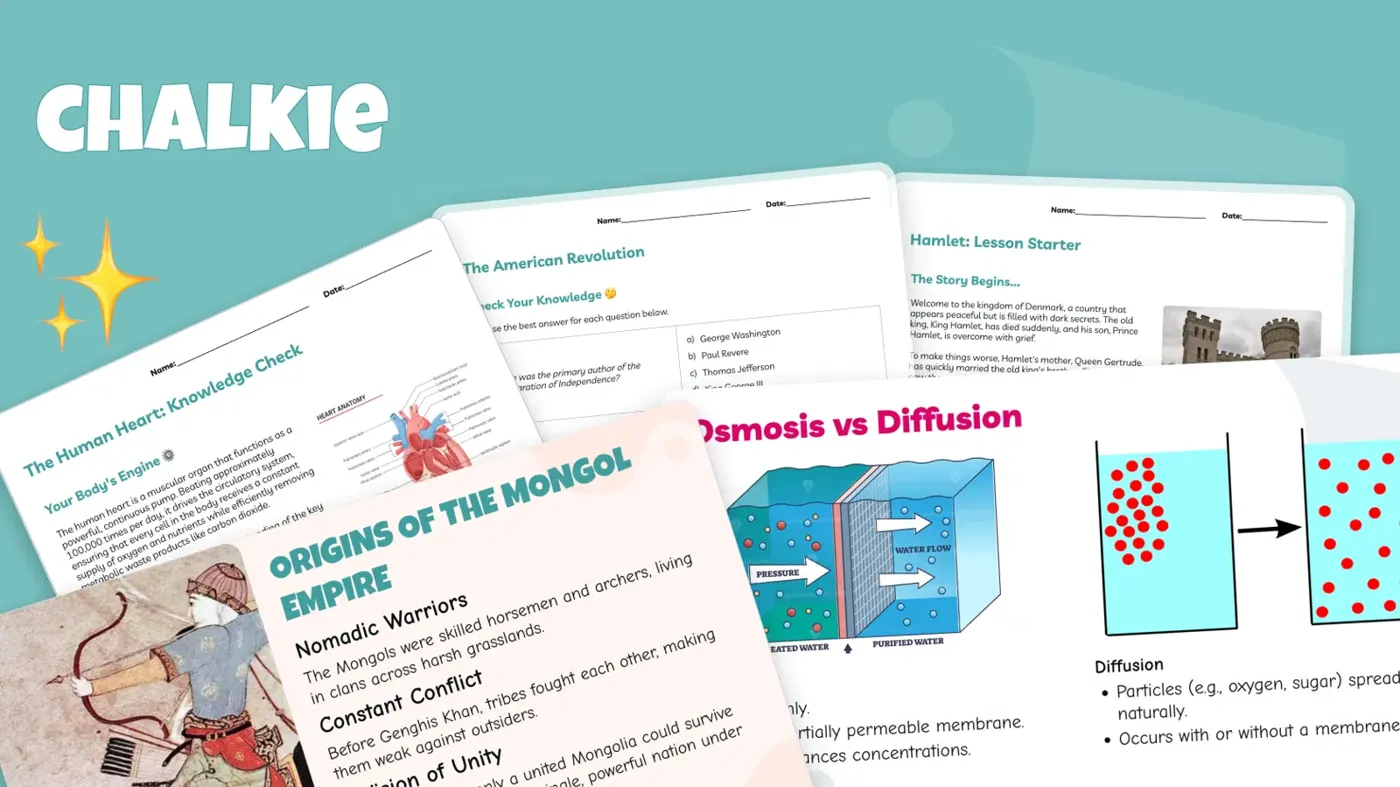
Our verdict on Chalkie AI
Chalkie AI is one of the best-value slide-first lesson generators in late 2026, turning a topic or your own materials into designed lessons and worksheets in minutes. Teachers who teach from slides should try it; skip it if you rarely use slides or need a tool that also handles reports and IEPs.
Pricing Free (5 resources/week); Pro US$6.65/mo billed yearly (US$79.80/yr); Max US$12.99/mo billed yearly (US$155.88/yr); Schools on quote
Visit Chalkie AIShort answer first: Chalkie AI is a lesson generator for teachers that turns a topic, a lesson plan, a file or a web link into a designed slide deck with matching worksheets and activities. Yes, Chalkie AI is free to start: the free plan gives you 5 resources every week with no card required, and paid plans begin at US$6.65 a month billed yearly. In late October 2026 it's one of the cheapest and best-reviewed slide-first tools for teachers, as long as you treat what it makes as a strong first draft.
Quick honesty note before we go further. Nobody on our team ran Chalkie through a hands-on test for this review, so I won't pretend I timed a lesson against my kettle. Instead, we looked at Chalkie as it stands in late October 2026 using its official pages, published reviews from people who did use it (Tech & Learning, Educational App Store and AI Tools Bakery), and around 33 recent teacher reviews on Trustpilot. When a test result belongs to someone else, I'll say whose it is.
Chalkie AI at a glance
- Our rating: 4.5 out of 5 (features 8.5, ease of use 9, value 9, performance 7.5).
- Best for: K-12 teachers who teach from slides and want a lesson, worksheet and differentiated versions in one go.
- Pricing: Free; Pro US$6.65/month (US$79.80 a year); Max US$12.99/month (US$155.88 a year); Schools on quote (checked October 2026).
- Website: chalkie.ai
What is Chalkie AI?
Chalkie is an AI lesson and resource generator built for classroom teachers by Chalkie AI Ltd, a UK company. You tell it what you want to teach, pick a subject, grade and curriculum, and it builds a slideshow with learning objectives, key vocabulary, explanations and activities already laid out. Tech & Learning sums up the difference well: the output "isn't just a written lesson plan", it's a formatted deck you can edit in Chalkie or export to Google Slides, PowerPoint or PDF.
That's the hook. Plenty of teacher AI tools hand you a wall of text that you then have to turn into slides yourself. Chalkie skips that step.
The company behind it is young but funded. In March 2026 Chalkie raised $4 million from TriplePoint Ventures, and at the time it said more than 500,000 teachers were using the platform, according to EdTech Innovation Hub. It was founded by CEO Phillip Daneshyar, CTO Mark Hughes (who previously founded the UK tutoring marketplace Tutorful) and CPO Peter Sanderson. Under the hood, Chalkie says on its responsible AI page that it "primarily" uses OpenAI and Google models.
Key features
Lessons from a topic, a plan, a file or a URL
You can start from scratch with a topic, paste in your own lesson plan, upload a document, PDF or image, or drop in a website link, as Tech & Learning describes. The company says a complete lesson can come back in under 30 seconds. In AI Tools Bakery's hands-on test, the prompt "photosynthesis, 9th grade biology, NGSS" produced a 14-slide lesson with a matching worksheet in about half a minute, and they called the slides "legitimately presentable" (AI Tools Bakery).
The URL option is the sneaky-useful one. AI Tools Bakery fed it a news article on coral bleaching and reported that the discussion questions were built from the actual article rather than generic reef facts.
Curriculum and standards alignment
For US teachers, Chalkie supports Common Core, NGSS, TEKS and C3, plus frameworks in other countries (Tech & Learning). Educational App Store also highlights UK and Australian curriculum coverage. One catch worth knowing: "Align to curriculum & standards" sits on the paid plans, not the free one, according to Chalkie's pricing page. So a free trial doesn't fully show you the feature many teachers are paying for.
Worksheets, activities and differentiation
Every lesson can spawn worksheets and activities, from card sorts and image matching to multiple-choice and fill-in-the-blank. Worksheets come in Scaffold and Stretch versions for different levels (Tech & Learning). AI Tools Bakery also found accessibility variants such as dyslexia-friendly, low-stimulation and ADHD-friendly formats, and said the dyslexia version really did change spacing and typeface.
This is the feature teachers rave about most. A special education teacher on Trustpilot wrote that they use Chalkie to build high school science and history lessons at a 2nd-grade reading level.
AI slide editing
Instead of regenerating a whole deck, you can tell Chalkie in plain English to simplify a slide, add an example or "make it more fun". AI Tools Bakery reported that these edit controls worked "about 8 times out of 10", with the misses tending to make content too cartoonish for older students. Good news on limits: in an October 2026 reply on Trustpilot, Chalkie said it had removed AI edit limits, and the current pricing page no longer lists an edit cap.
Lesson series and unit planning
The unit planner builds a sequence of lessons around a topic, including recap and quiz lessons. Pro allows series of up to 12 lessons and Max up to 25 (Chalkie pricing). Teachers on Trustpilot mention using it to break a term's unit into week-by-week lessons, and to knock out cover work when a colleague is unexpectedly off.
Videos, themes and exports
Paid plans can pull YouTube videos into slides; Educational App Store said suggested clips typically came from reputable sources such as BBC Bitesize and called it "an unexpected timesaver". Pro gets one custom theme, Max gets unlimited themes and fonts, and every plan exports to Google and Microsoft formats.
Schools plan
The Schools tier adds linked teacher accounts, admin controls and tracking, and centralized billing. Tech & Learning notes that Chalkie says it doesn't require student data and describes itself as FERPA and COPPA compliant.
Is Chalkie AI free? Pricing and plans
Chalkie AI is free to use with limits. Here's what each plan includes (checked October 2026 on the official pricing page):
| Plan | Price | Resources | Main extras |
|---|---|---|---|
| Free | US$0, no card | 5 per week | Lessons and activities, export to Google and Microsoft |
| Pro | US$6.65/month (US$79.80 billed yearly) | 200 per month | Curriculum alignment, no Chalkie badge, YouTube videos, series up to 12 lessons, lessons up to 25 slides, 1 custom theme |
| Max | US$12.99/month (US$155.88 billed yearly) | 400 per month | Unlimited custom themes and fonts, series up to 25 lessons, lessons up to 35 slides |
| Schools | Custom quote | Custom | Custom lessons, linked teacher accounts, admin controls, centralized billing |
Monthly billing also exists. AI Tools Bakery listed it at $8.99 a month for Pro and $16.99 for Max when it checked in September 2026, but the yearly price is the one Chalkie advertises.
So what does the free plan really get you? Five resources a week sounds generous until you count. A lesson, its worksheet and a differentiated version can eat three of them, which is exactly the math AI Tools Bakery did before concluding the free tier is "a trial that does not expire, not a working tier" for a full-time teacher. Free exports also carry the Chalkie badge. For one or two lessons a week, though, it's plenty to decide whether Chalkie suits you.
One billing warning from users: an Australian reviewer on Trustpilot complained they got no reminder before their yearly subscription renewed at a higher price. Set a calendar note if you buy an annual plan.
Performance and independent testing
Since we didn't test it ourselves, here's what the people who did found.
Speed is real. AI Tools Bakery said a lesson that would normally take them 45 to 60 minutes to plan and design took about 12 minutes with Chalkie, including review and fixes. Chalkie's own claim is that teachers save an average of five hours a week, though EdTech Innovation Hub rightly notes that figure is self-reported.
Design is a strength. Educational App Store found the activity text "consistently suitable for the activity, topic, and age group", though you may need to swap some images. Teachers on Trustpilot keep coming back to how good the slides look.
Accuracy needs a teacher's eye. AI Tools Bakery caught an oversimplified high school explanation and a history deck that dated an event precisely on one slide and vaguely on another. A chemistry teacher who made more than 50 lessons told Trustpilot that the decks still need "a significant amount of editing", citing stray LaTeX, wrong subscripts, layout overflow and hit-and-miss images. Chalkie replied that it had since released an equations feature to fix the notation problems. Another teacher reported lessons about a children's book that invented plot details that weren't in the story.
Chalkie is upfront about this itself. Its responsible AI page warns that AI "can be wrong" and tells teachers to review everything before using it with students.
My read: Chalkie is very good at structure and presentation, decent at content for younger grades, and needs more checking the higher and more technical you go.
Who it's for
- Teachers who teach from slides. If your day runs through a projector, Chalkie automates the most time-hungry bit of prep.
- New teachers building a library. One first-year teacher on Trustpilot called it a "lifesaver" that a mentor recommended.
- SEN and mixed-ability classrooms. Scaffold and Stretch worksheets plus accessibility variants save real time.
- Language teachers. Reviewers mention using it for French and Spanish classes, and Val on Trustpilot praised it for presentations "in any language".
Skip it, or stick to the free plan, if you rarely use slides, teach dense upper-level content where every slide needs expanding, or want one tool that also writes report comments and IEPs. And if your school only allows approved vendors, check the list first.
Students won't get much from Chalkie directly, as it's a teacher tool. If you're a student, our guides to the best AI for studying and the best free AI tools for students are a better fit, along with homework helpers like the one in our Gauth AI review.
Chalkie AI alternatives worth considering
- MagicSchool AI: pick it if you want a broad toolkit (rubrics, report comments, IEP help) rather than designed slides. Our Magic School AI review covers its plans.
- Gamma: a general AI presentation maker that suits teachers who also build decks for work outside class. See our Gamma AI review.
- Coteach AI: another teacher-focused assistant worth comparing if you want planning help beyond slides. Read our Coteach AI review.
Curious about the bigger picture? Our explainer on AI in education looks at where tools like these fit, and if you want to learn the basics yourself, start with our guide to free AI courses.
Verdict: who should use it and who should skip it
Chalkie AI does one job and does it well. It turns a teaching idea into a designed, editable lesson with worksheets in minutes, it's free to try, and at US$79.80 a year Pro is cheap for what you get. Teacher feedback is overwhelmingly positive, with a 4.8 rating from 337 reviews on Trustpilot.
The caveats are the ones you'd expect. Curriculum alignment is paywalled, the free tier runs out quickly, accuracy slips on technical and senior content, and a handful of users report slow or generic customer support.
If you teach from slides, try the free plan this week. If you teach mostly discussion, labs or dense upper-level material, you'll get less out of it.
FAQ
Is Chalkie AI free?
Yes. Chalkie AI has a free plan that needs no card and lets you create 5 resources every week, including lessons and activities, with export to Google Slides and PowerPoint. Curriculum alignment, YouTube videos and badge removal require Pro, which costs US$6.65 a month billed yearly (checked October 2026).
How much does Chalkie Pro cost?
Chalkie Pro costs US$6.65 a month when billed yearly, which is US$79.80 a year. It includes 200 resources a month, standards alignment, lesson series up to 12 lessons and lessons up to 25 slides. Max costs US$12.99 a month billed yearly (US$155.88) and doubles the resource allowance to 400 a month.
Can Chalkie export to Google Slides and PowerPoint?
Yes. Every Chalkie plan, including Free, can export to Google and Microsoft formats, and Tech & Learning confirms PDF export too. Exported decks stay editable, so you can tweak slides in Google Slides or PowerPoint after generating them. Free plan exports carry a small Chalkie badge that Pro removes.
Is Chalkie AI accurate?
Mostly, but not always. Independent reviewers found content solid for elementary and middle school, with occasional oversimplification at high school level, and teachers have reported formatting errors in chemistry and invented story details. Chalkie itself warns that AI can be wrong, so check every lesson before you teach it.
Is Chalkie safe for schools?
Chalkie says it doesn't require student data and describes itself as FERPA and COPPA compliant, according to Tech & Learning. Its responsible AI page tells teachers to keep student names, grades and identifying details out of prompts. Schools can buy a dedicated plan with admin controls and centralized billing.
What video reviewers say
Videos load from YouTube only when you press play.
Ratings around the web
Ratings as of 1 Nov 2026. Scores change over time; follow the links for the latest.
What users are saying
We read 33 recent Trustpilot reviews (most from October 2026), including every 1- to 3-star English review shown. Teachers overwhelmingly praise the time saved and the look of the slides, while the few critical reviews focus on accuracy, formatting and customer support. Because we read all the low-star reviews, this sample is slightly more negative than Trustpilot's overall star breakdown.
Common praise
- Saves hours of lesson and worksheet prep
- Attractive, engaging slides students like
- Easy differentiation for SEN and mixed-ability classes
Common complaints
- Content and formatting errors in technical subjects or book-based lessons
- Slow or generic customer support
- Billing issues, including renewals without reminders
Based on: Trustpilot reviews of Chalkie, Trustpilot reviews of Chalkie (page 2), Trustpilot 1-3 star reviews of Chalkie
What we like
- Produces designed, editable slide decks rather than a text-only lesson plan
- Scaffold and Stretch worksheets plus accessibility variants for mixed-ability classes
- Supports Common Core, NGSS, TEKS, C3 and UK and Australian curricula
- Exports to Google Slides, PowerPoint and PDF on every plan
- Pro is cheap at US$79.80 a year
What could be better
- Curriculum alignment is not included on the free plan
- Free tier of 5 resources a week runs out quickly
- Accuracy and formatting slip on technical and senior content, so lessons need checking
- Some users report slow, generic support and surprise renewals
Sources
- Plans & Pricing | Chalkie (Chalkie)
- Your best lesson. Every lesson. | Chalkie (Chalkie)
- Using AI responsibly | Chalkie (Chalkie)
- What is Chalkie and How Can I Use It To Teach? (Tech & Learning)
- Chalkie Review - Features, Pricing, Pros & Cons (Educational App Store)
- Chalkie AI Review 2026: Features, Free Plan, Pros and Cons (AI Tools Bakery)
- Chalkie raises $4M as AI lesson planning grows (EdTech Innovation Hub)
- Chalkie Reviews (Trustpilot)
- Chalkie 1-3 star reviews (Trustpilot)
- Chalkie Reviews, page 2 (Trustpilot)