Best non AI search engine options in 2026: 7 picks for every budget
Want links, not AI summaries? These seven non AI search engines, from DuckDuckGo No-AI to Kagi and Google's Web filter, keep AI out of your results.
 Written byMuhammad Usman SiddiquiFounder and editor-in-chief
Why you can trust The AI Future
Our writers research every product from its official pages, independent tests and user reports, link each claim to its source and correct mistakes openly. Unless an article says otherwise, we haven't tested the product hands-on ourselves. Companies can't pay for coverage or see reviews before they're published.
Read our editorial policy
Short answer: if you want a non AI search engine that costs nothing and feels familiar, use DuckDuckGo No-AI at noai.duckduckgo.com. If you're happy to pay for clean, ad-free results, Kagi at $10 a month is the one I'd pick. And if you can't leave Google, its hidden Web filter strips out AI Overviews without changing engines.
That's the quick version. The longer one matters because "no AI" means different things on different sites: some engines have removed AI features completely, some hide them behind a toggle, and a couple have never built them at all. Below are seven options, ranked for people who want links first and summaries never, with prices checked in early November 2026.
Key takeaways
- DuckDuckGo's No-AI page is the easiest switch for most people, since it's free and removes AI answers, chat prompts and most AI images.
- Startpage gives you Google-sourced results with no AI summaries on the results page, which suits people who still like Google's ranking.
- Kagi is the strongest paid option, with plans from $5 a month and AI tools that stay out of the way unless you ask for them.
- Google has no setting that turns AI Overviews off, but the Web filter (the udm=14 parameter) gives you a plain page of links.
- Brave Search has its own index but shows AI answers by default, and its off switch is stored in a cookie.
Our ranking method
Nobody at The AI Future ran hands-on tests for this roundup. We compared each search engine using its own product and help pages, independent coverage from outlets like TechCrunch, Tom's Guide and Windows Central, user forums and Trustpilot ratings, as of early November 2026. We ranked them on six criteria:
- How completely AI features are removed or switched off by default.
- How durable the no-AI setting is, for example whether it survives clearing cookies.
- Result quality and where results come from (own index, Google or Bing).
- Privacy and tracking practices.
- Price, including how much the free tier gives you.
- How easy it is to set as your default on desktop and mobile.
Engines that ship with zero AI on the results page ranked highest. Ones that need you to dig through settings, or that reset themselves, ranked lower.
The 7 best non AI search engines at a glance
| # | Tool | Category | Best for | Free tier | Starts at |
|---|---|---|---|---|---|
| 1 | DuckDuckGo No-AI | Private search | Most people switching from Google | Yes | Free |
| 2 | Startpage | Private search | Google results without Google | Yes | Free |
| 3 | Kagi | Paid search | Ad-free results you control | Yes (limited) | $5/mo |
| 4 | Mojeek | Independent index | Results not sourced from Google or Bing | Yes | Free |
| 5 | Google Web filter | Search filter | Staying on Google | Yes | Free |
| 6 | Brave Search | Independent index | Brave browser users | Yes | $3/mo |
| 7 | Marginalia Search | Indie web discovery | Finding small, non-commercial sites | Yes | Free |
Brave's $3 plan only removes ads; search itself is free. Kagi's free trial covers 100 searches.
The best non AI search engines in 2026, ranked
DuckDuckGo No-AI – best for most people switching from Google
DuckDuckGo No-AI is a version of DuckDuckGo's private search with AI answers and chat removed and AI-generated images filtered out of image results by default.
Strengths
This is the obvious first stop, and the numbers suggest plenty of people agree. After Google's I/O announcements on May 19, 2026, DuckDuckGo told MacRumors that visits to its No AI page more than tripled, hitting the 3x mark on May 28 and averaging around 84 percent above baseline since. On June 1, it launched Chrome and Firefox extensions that set noai.duckduckgo.com as your default, so you don't have to remember the address.
Results are mostly Bing's. DuckDuckGo says it sources traditional links "largely" from Bing, as Windows Central points out, though it also runs its own crawler. Ratings are mixed: DuckDuckGo sits at 2.5 out of 5 from 658 Trustpilot reviews, and a lot of the recent complaints are about AI features creeping into the main product (which is, honestly, the whole reason the No-AI page exists).
Key features
- No AI-assisted answers, no chat prompts and fewer AI images.
- Browser extensions for Chrome and Firefox that make No-AI the default.
- The DuckDuckGo browser keeps your AI settings even after you clear history.
- Same private, untracked search as regular DuckDuckGo.
- Instant answers from sources such as Wikipedia and Sportradar.
Pros
- Free, with no account needed.
- AI is removed, not just hidden behind a toggle.
- Familiar results for anyone used to Bing or Google.
Cons
- On Apple devices you can pick DuckDuckGo as default, but not the No AI page itself.
- Results lean heavily on Bing.
- The company still sells an AI subscription and runs Duck.ai, so the main site keeps adding AI.
DuckDuckGo No-AI pricing: Free (checked November 2026). See pricing
Related: Best browsers that don't use AI
Verdict: if you only pick one, pick this.
Startpage – best for Google results without Google
Startpage is a Dutch private search engine, launched in 2006, that fetches results from Google on your behalf and strips out anything that identifies you.
Strengths
Startpage is probably the best answer for people who like Google's ranking but hate what's been bolted on top of it. Digit describes it as running your searches through Google on your behalf without passing on your IP address, and Tom's Guide confirms you won't see AI summaries at the top of results. There's a separate AI chat app with models from OpenAI, Perplexity and Anthropic, but it isn't part of search.
User feedback is thin and grumpy. Startpage has a 1.9 Trustpilot score from 102 reviews, and one July 2026 reviewer wrote that "recently it has added junk buttons below the search bar." That's a fair warning sign; I'd watch whether those buttons turn into AI features.
Key features
- Google-sourced results with no personal profile attached.
- Anonymous View opens result pages through a proxy.
- No IP address, cookies or search history stored.
- No AI summaries injected into results.
Pros
- Close to classic Google result quality.
- Free and needs no account.
- Anonymous View is a useful extra for privacy.
Cons
- Poor Trustpilot rating, with complaints about interface changes.
- Depends entirely on Google for its index.
- Runs a standalone AI chat product alongside search.
Startpage pricing: Free (checked November 2026). See pricing
Verdict: the pick for Google loyalists who want out.
Kagi – best for ad-free results you control
Kagi is a paid, ad-free search engine funded by subscriptions, with optional AI tools that stay hidden unless you call them up.
Strengths
Kagi's pitch is simple: pay with money instead of attention. MacRumors notes there's no visible AI information unless you opt for AI tools, and you can block or boost whole domains so the sites you hate stop appearing. Its one AI default is small. Ending a query with a question mark triggers Quick Answer, a summary of the results, and you can switch that off with the Auto Quick Answer toggle in settings.
Kagi has only 18 Trustpilot reviews, averaging 3.5, so there isn't much third-party rating data. I like the fair-pricing rule a lot: if you don't search in a given month, Kagi credits that month back to you.
Key features
- No ads and no tracking, paid for by subscriptions.
- Domain blocking and boosting to personalise rankings.
- Optional Quick Answer and Kagi Assistant, off unless you trigger them.
- Unused months are credited back automatically.
- Draws on several sources, including Mojeek's index.
Pros
- Cleanest results page on this list.
- You decide exactly when AI appears.
- Unlimited searches for $10 a month.
Cons
- No real free plan, just a 100-search trial.
- The $5 Starter plan caps you at 300 searches.
- Its top $25 plan is mostly about premium AI models, which you probably don't want.
Kagi pricing: Free trial of 100 searches, then paid plans from $5/month for 300 searches, $10/month for unlimited and $25/month with premium AI (checked November 2026). See pricing
Related: Best AI search engines
Verdict: worth $10 a month if you search all day.
Mojeek – best for results not sourced from Google or Bing
Mojeek is a UK search engine with its own crawler and index, built from scratch and run without user tracking.
Strengths
Most "alternative" engines borrow Google's or Bing's results. Mojeek doesn't. Marc Smith started it in 2004 as a personal project, and by October 2022 its index passed 6 billion pages, according to Wikipedia; it was also the first search engine with a privacy policy that ruled out tracking, back in 2006. There's a "summarize these results" option built on open-weight Mistral models, but Tom's Guide confirms AI summaries are off by default and only run if you click.
Expect rougher results than Google. Mojeek's Trustpilot score is 2.3 from 19 reviews, and Reddit blocked it (along with other non-Google engines) in 2024, which hurts for the many queries where a Reddit thread is the best answer.
Key features
- Independent index of billions of pages.
- No tracking, profiling or personalised results.
- Optional, click-to-run result summaries.
- Available in English, French and German.
Pros
- Truly independent results.
- AI summaries are off unless you ask.
- Free.
Cons
- Smaller index than Google or Bing.
- No Reddit results.
- Low Trustpilot rating.
Mojeek pricing: Free (checked November 2026). See pricing
Verdict: a good second engine, not a full Google replacement.
Google Web filter – best for staying on Google
The Web filter is a built-in Google results view, reached through the "Web" tab or the udm=14 URL parameter, that shows plain links with no AI Overview.
Strengths
Google doesn't offer an off switch for AI Overviews. GEOToolbox quotes Google's own help text, "Features cannot be turned off", and calls the Web filter the closest thing to an off switch. Google added the filter in May 2024. Clicking the tab on each search gets old fast, so the better move is a custom search engine in Chrome using the URL {google:baseURL}search?udm=14&q=%s, which makes every address-bar search AI-free.
This matters more since May 19, 2026, when Google showed off an AI-first search box with follow-up questions and search agents. If you'd rather keep Google but lose the chat, see our guide on how to turn off AI Mode on Google.
Key features
- Plain blue links with no AI Overview.
- Works with a URL parameter, so you can set it as a default engine.
- Keeps Google's index and ranking.
- No extension or account needed.
Pros
- Google-quality results without the overview.
- Free and built in.
- Easy to set as the address-bar default on desktop.
Cons
- Also strips shopping, knowledge panels, video carousels and most map packs.
- The Web Guide Labs experiment can add AI summaries back to this tab.
- Google still tracks your searches.
- Harder to set up on mobile.
Google Web filter pricing: Free (checked November 2026). See pricing
Related: How to get rid of AI Overview Google AI Mode review
Verdict: the zero-effort fix if switching engines feels like too much.
Brave Search – best for Brave browser users
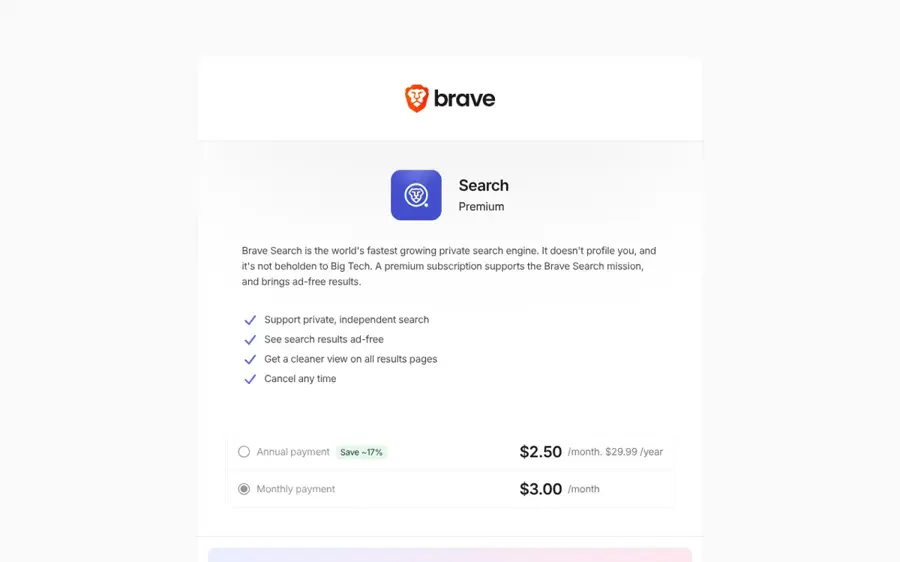
Brave Search is an independent search engine with its own index, launched in 2021, with an "Answer with AI" feature you can switch off in settings.
Strengths
Brave's selling point is independence: its results come mainly from its own search index rather than Google or Bing. But Tom's Guide says AI summaries are turned on by default, and you'll need to toggle off Answer with AI in search settings. On Brave's own forum, a support volunteer explains the setting is "cookies based so if you have anything clearing, it will switch back." A Brave staffer in the same thread says the toggle doesn't remove the AI button from the search field either.
The unclaimed search.brave.com page on Trustpilot shows 3.9, though that's from just 13 reviews. Not much to go on.
Key features
- Own web index, independent of Google and Bing.
- Answer with AI toggle in search settings.
- Goggles for re-ranking results with custom rules.
- Premium tier for ad-free results.
Pros
- Independent results that work well for technical searches, according to Digit.
- Free, with an optional $3 ad-free plan.
- Pairs well with the Brave browser.
Cons
- AI answers are on by default.
- The off setting resets if cookies are cleared.
- Premium only works inside the Brave browser.
Brave Search pricing: Free, then Premium for ad-free results at $3/month or $29.99/year (checked November 2026). See pricing
Related: Browsers that don't use AI
Verdict: fine if you already use Brave, fiddly if you don't.
Marginalia Search – best for finding small, non-commercial sites
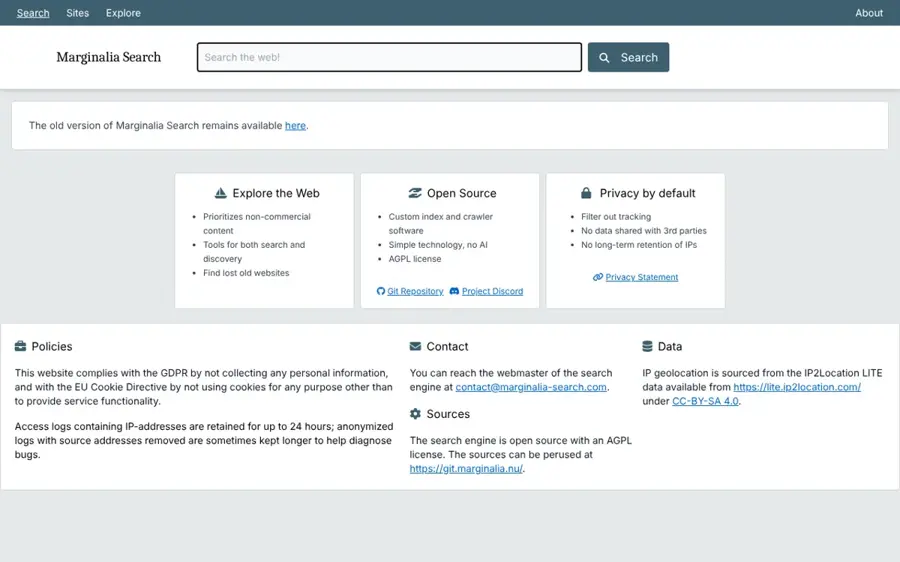
Marginalia Search is an open source search engine from Sweden that prioritises non-commercial websites and uses, in its own words, "simple technology, no AI".
Strengths
Marginalia is a niche tool and doesn't pretend otherwise. Its developer, Viktor Lofgren, says it isn't seeking to replace Bing or Google but to complement them. It shines when you want personal blogs, old hobby sites and essays that big engines bury under product pages. I couldn't find a Trustpilot profile or app store rating for it, so there's no third-party score to report.
Key features
- Custom index and crawler, open source under AGPL.
- Prioritises non-commercial content.
- Filters out tracking, with no data shared with third parties.
- No long-term retention of IP addresses.
Pros
- No AI anywhere in the product.
- Great for discovery and browsing.
- Free and open source.
Cons
- Not built for everyday queries like opening hours or prices.
- Small project run largely by one person.
Marginalia Search pricing: Free (checked November 2026). See pricing
Verdict: a lovely side door to the web.
Choosing the right non AI search engine
Decide whether you mean no AI or just no summaries
If AI-generated images in results bother you as much as overviews, DuckDuckGo No-AI and Marginalia are the cleanest. If you only mind the summary box at the top, Startpage or Google's Web filter will do.
Check that the off switch actually sticks
Brave's toggle lives in a cookie, so clearing site data turns AI back on. DuckDuckGo's browser keeps the setting through history wipes, and Kagi's preferences sit in your account. If you clear cookies on exit (lots of privacy-minded people do), pick an engine where no-AI is the default rather than a preference.
Match the index to your searches
Startpage gives you Google's results; DuckDuckGo leans on Bing. Mojeek, Brave and Marginalia run their own indexes, which means fresher variety but more misses on local and shopping queries. I'd keep two engines: one main, one backup.
Set it as your default on each device
An engine you have to type in manually won't last a week. Use DuckDuckGo's extensions on desktop, or the udm=14 custom engine trick in Chrome. On iPhone, you're limited to the engines Apple lists.
Free vs paid: what you actually get
Six of these seven engines are free, and for most people free is enough. You pay for free search with ads (DuckDuckGo, Startpage, Mojeek and Brave all show them) or, with Google, with your search history.
Paying changes two things. Kagi removes ads entirely and lets you reshape rankings; Brave's $3 Premium just removes ads. Here's how the paid options compare:
| Plan | Price | What you get |
|---|---|---|
| Kagi Trial | Free | 100 searches |
| Kagi Starter | $5/mo | 300 searches, Quick mode Assistant |
| Kagi Professional | $10/mo | Unlimited searches |
| Kagi Ultimate | $25/mo | Unlimited searches plus premium AI models |
| Brave Search Premium | $3/mo or $29.99/yr | Ad-free results in the Brave browser |
Digit also lists a $14 Kagi family plan. If you're avoiding AI, Kagi Ultimate makes little sense, because most of the extra money goes on AI models.
Final verdict
Start with DuckDuckGo No-AI. It's free, it removes AI rather than hiding it, and the browser extensions make it stick. If you search for a living and the ads bug you, I think Kagi Professional at $10 a month is the best money you can spend on search right now. Google's Web filter is the lazy fix, and that's fine (I'd still set it up even if you switch engines, as a backup for the times only Google has the answer).
The one I'd skip, for now, is Brave Search, unless Brave makes its no-AI setting survive a cookie wipe.
FAQ
Is there a search engine without AI?
Yes. Marginalia Search has no AI features at all, and DuckDuckGo's No-AI page at noai.duckduckgo.com removes AI answers and chat. Startpage doesn't put AI summaries on its results pages, and Mojeek only summarises results if you click the option. All four are free.
Does DuckDuckGo have AI?
Regular DuckDuckGo has optional AI answers and the Duck.ai chatbot, which you can switch off in settings. The No-AI version removes those features completely and filters AI images out of image results by default.
Can you turn off AI Overviews on Google?
Not completely. Google says AI Overviews are a core feature that can't be turned off. You can avoid them with the Web filter, either by clicking the Web tab after a search or by adding udm=14 to the search URL. Setting a custom Chrome search engine with that parameter makes it automatic.
What's the best non AI search engine for privacy?
DuckDuckGo No-AI and Startpage are both strong choices, since neither builds a profile of you. Startpage also offers Anonymous View, which opens result pages through a proxy. Mojeek runs its own index and has refused to track users since 2006, which makes it the most independent of the three. I'd pick DuckDuckGo No-AI for everyday use and Mojeek as a backup.
Is Kagi worth paying for?
Probably, if you search heavily and dislike ads. Kagi costs $10 a month for unlimited searches, shows no ads, keeps AI hidden unless you trigger it, and credits back any month you don't use. Light searchers can try 100 free searches first or pay $5 a month for 300.