Citrus AI review: the free one‑tap photo enhancer, pros, cons and pricing
Citrus AI is a free one-tap photo enhancer for web, iOS and Android. We look at its features, Citrus Plus pricing, user ratings and where it falls short.
 Written byFahad HashmiContributing writer, AI in energy and industry
Why you can trust The AI Future
Our writers research every product from its official pages, independent tests and user reports, link each claim to its source and correct mistakes openly. Unless an article says otherwise, we haven't tested the product hands-on ourselves. Companies can't pay for coverage or see reviews before they're published.
Read our editorial policy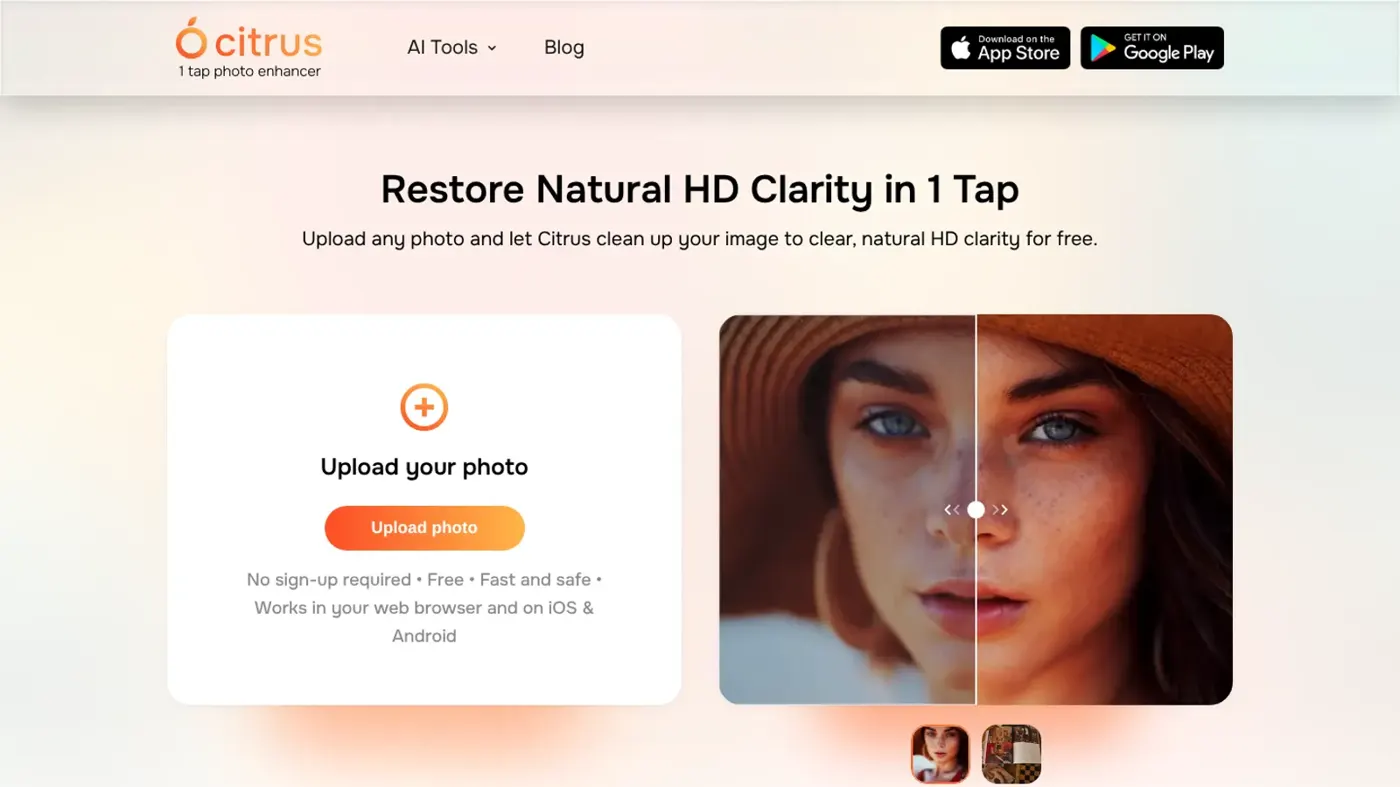
Our verdict on Citrus AI (Citrus 1 Tap Photo Enhancer)
Citrus AI is a fast, generous free photo enhancer that's great for selfies, photo dumps and rescuing blurry shots. Skip it if you need manual control, exact output sizes or dependable paid support, and if you pay, choose the yearly plan.
Pricing Free with ads and watermark; Citrus Plus from $2.99/week or $39.99/year on the US App Store (3-day free trial)
Visit Citrus AI (Citrus 1 Tap Photo Enhancer)Citrus AI is a one-tap photo enhancer from a small Canadian studio called Wemagine.ai: you upload a blurry, grainy or low-resolution photo, press one button, and it hands back a sharper, cleaner version. It's free on the web, iOS and Android, and I think it's worth a try if you want quick fixes for selfies and photo dumps. Skip it if you need manual control, because there isn't any.
The free version shows ads and adds a watermark. Citrus Plus removes both and adds batch processing, and it's sold weekly or yearly. That billing choice matters more than anything else on the price list (more on the maths below).
Citrus AI in brief
Citrus started life as an iPhone app in May 2022 and now runs in three places: the iOS app, the Android app and a free web version at justcitrusit.com that needs no sign-up. It's built by Wemagine.ai LLP, a team of two founders based in Richmond, British Columbia, whose first app was the cartoon filter Voilà AI Artist.
It's busy. The Android listing shows more than 1 million downloads and the app was updated on November 16, while the iPhone version reached 2.6.2 two days later. The store listings claim more than 20 million photos go through Citrus every month; the Citrus homepage says 10 million images a month and 1 million users. I can't square those two figures, so I'd treat both as marketing rather than measurement.
Here's the mental model. A photo enhancer like this is an image model trained on pairs of degraded and clean photos, so it learns to guess what a sharp version of your blurry shot probably looked like. That guess is the whole product. When the guess is good, a soft selfie looks crisp; when it's wrong, skin turns waxy or text becomes nonsense, because the model is inventing detail it never saw.
Two apps share the Citrus AI name
Search "Citrus AI" on the App Store and you'll also find an unrelated chat app from Citrus Technology Consulting LLC. That one is a chatbot that says it's "Powered by OpenAI", sells a Pro tier at $9.99, $19.99 or $199.99, and doesn't have enough ratings for Apple to show a score. This review is about the photo app. If you were after a chatbot, our Google AI vs ChatGPT comparison is a better place to start than a little-known wrapper.
Key features
One-tap enhancement
There's one main action: pick a photo, tap, wait a few seconds, compare. Citrus adjusts sharpness, detail, colour and lighting in a single pass, and the before/after slider lets you check the change before you save. No sliders, no masks, no settings to learn.
Unblur and sharpen
The app targets soft focus, camera shake and motion blur, and it tries to restore edges on faces, objects and backgrounds together. That last part is a real difference from some rivals. One App Store reviewer who preferred Remini's quality still noted that Remini "will sometimes fix the face and leave the body and background essentially untouched", whereas Citrus "at least tries to touch up the whole pic every time".
Noise, colour and lighting
Grain from dim indoor shots gets smoothed, flat colours get a lift, and over- or under-exposed photos are rebalanced. Wemagine's pitch is restraint: "No plastic skin. No cartoon filters." Whether it keeps that promise depends on the photo, as you'll see further down.
Upscaling low-resolution photos
Citrus also upscales small or heavily compressed images, which is handy for old screenshots or photos saved from messaging apps. Neither the site nor the store listings publish an output resolution or file-size limit, which I'd have liked to see. If exact pixel counts matter, a dedicated AI image enlarger will give you more control.
Batch processing for photo dumps
The app's whole personality is aimed at TikTok photo dumps and Instagram slideshows, so it can process several photos at once with a consistent look. Batch mode is part of Citrus Plus, along with what the listings call "turbo" processing.
Free web version
The browser version takes a drag-and-drop upload and works on a laptop without installing anything. For a one-off fix, that's probably the easiest route.
Citrus AI pricing and plans
Pricing is app-store based, so there isn't a public pricing page. Citrus Plus comes with a 3-day free trial and renews automatically, weekly or yearly, until you cancel in your App Store or Google Play settings. The US App Store lists several price points for the same subscription, which usually means different offers shown to different users.
| Plan | Price (US App Store) | What you get |
|---|---|---|
| Free | $0 | One-tap enhancement on web, iOS and Android, with ads and a watermark |
| Citrus Plus weekly | $2.99, $4.99 or $5.99 a week | Unlimited enhancements, no watermark, no ads, faster processing, batch processing |
| Citrus Plus yearly | $39.99 or $69.99 a year | Same as weekly |
Inside the free plan
Every core tool is free: unblur, sharpen, denoise, colour fixes and upscaling. The Citrus FAQ calls the upgrade "totally optional", and plenty of reviewers agree; one wrote that it "didn't limit you in the amount of photos you could enhance each day as far as I know". The costs of staying free are ads, a watermark and slower processing. Wemagine doesn't publish a daily cap for free users, so I can't tell you one.
A worked example: weekly vs yearly
Weekly billing looks cheap and isn't. At $5.99 a week, a year of Citrus Plus costs 52 × $5.99 = $311.48. The $39.99 yearly plan costs about 13% of that, and even the $69.99 yearly tier is under a quarter of it. Put another way, the $39.99 plan pays for itself in about seven weeks compared with the top weekly price.
So my advice is clear. If you're going to pay, pay yearly, or use the 3-day trial for one batch job and cancel straight after.
Performance and where it breaks
There aren't any published lab tests of Citrus that I could find, so the best evidence is the store ratings and what people write in reviews. Those numbers are strong. On the US App Store the app averages 4.8 out of 5 from 19,711 ratings, and Google Play shows 4.9 from about 11,400 reviews.
Read the reviews and a pattern appears. People like the speed and the fact that the results usually look like the original photo, only cleaner; one Google Play reviewer wrote that other apps made them "look ai generated after enchancing it but this one is just chefs kiss". A parent on the App Store said it rescued blurry shots of a "very hyper" child that even an iPhone couldn't freeze.
Where it breaks:
- Consistency. One reviewer put it bluntly: "One time you upload a photo it'll look realistic and clear. The next time it'll look ai generated."
- Over-editing. Another App Store review says it "has a tendency to over-edit sometimes and turn photos almost cartoonish".
- AI labels. A user reported that an improved photo uploaded to TikTok got labelled "AI generated", which matters if you post as yourself.
- Errors. Several reviews mention an "error occurred" or "Oops something went wrong" message, and one paying subscriber said the app stopped working for months without a reply from support.
That last point bothers me most. A free app that occasionally fails is fine; a yearly subscription with no visible support is a different story, and it's another reason to start with the trial rather than paying upfront.
A practical tip from a Google Play reviewer: running the same photo through two or three times can give a clearer result. I'd be careful with that, though, because each pass is another round of guessed detail, and the waxy look tends to build up.
Privacy and your photos
The Citrus privacy policy says the app uploads only the photos you pick for editing, doesn't store them in the cloud and doesn't collect facial biometric data. It does collect usage data through Google's Firebase, and Apple's privacy label says that usage data may be used to track you across other companies' apps and websites. The policy is dated April 2022; I'd like a newer one for an app updated this often.
Since Citrus edits faces, stick to your own photos or ones you have permission to edit. Making deceptive images of real people without consent is harmful, and it's illegal in many places.
Best suited to
Citrus fits people who want a quick fix and don't want to learn an editor.
| You want to... | Citrus AI? | Reason |
|---|---|---|
| Clean up selfies and photo dumps | Yes | One tap, batch mode, natural look most of the time |
| Fix a single blurry photo on a laptop | Yes | Free web version with no sign-up |
| Restore old family photos | Maybe | Works on grainy prints, but check faces closely for invented detail |
| Print large or hit exact resolutions | No | No published output size or manual controls |
| Professional or client work | No | Results vary between runs and support looks thin |
If old prints are your main job, our guide on restoring old photos with AI covers the steps around the enhancer, like scanning at a decent resolution first.
Citrus AI alternatives
- Remini is probably the best-known face enhancer, owned by Bending Spoons. Pick it if faces are what you care about and you want video enhancement too.
- Let's Enhance runs on monthly credits (one image per credit) and accepts inputs up to 64 megapixels. Choose it when you need large, predictable upscales for print or ecommerce.
- GoEnhance covers images and video in one tool; our GoEnhance AI review walks through its plans. It suits creators who also edit clips.
For a wider list, see our roundup of AI photo retouching tools, and if you'd rather create images than fix them, try the best AI image generators instead.
Verdict
I'd give Citrus AI 4 out of 5. It does one job, it does it quickly, and the free tier is more generous than most enhancer free tiers, in my view, with no published daily cap and every core tool included. The ratings back that up.
Use it for selfies, photo dumps and quick rescues of blurry shots, and check each result before you post. Skip it if you need control over the output or a reliable paid service; the support complaints and the confusing weekly pricing are real. And honestly, if you do pay, the $39.99 yearly plan is the only option I'd consider.
FAQ
Is Citrus AI free?
Yes. Every core tool works free on the web, iOS and Android, with ads and a watermark. Citrus Plus removes both and adds batch and faster processing, from $2.99 a week or $39.99 a year on the US App Store, after a 3-day trial.
Is Citrus AI safe to use?
It seems reasonably safe for everyday photos. The privacy policy says only the photos you select are uploaded and they aren't stored in the cloud, though usage data is collected through Firebase and may be used for tracking. Avoid uploading anything sensitive.
Does Citrus AI work on Android and PC?
Yes. There's an Android app with more than 1 million downloads, plus a free browser version at justcitrusit.com that needs no account.
Is the Citrus AI photo app the same as the Citrus AI chatbot?
No. The photo enhancer is made by Wemagine.ai LLP. The chatbot called Citrus AI comes from a different company, Citrus Technology Consulting LLC, and is an OpenAI-powered chat app with its own Pro subscription.
Can people tell a photo was improved with Citrus AI?
Sometimes. Most results look natural, but some come out smooth or cartoonish, and one user said TikTok labelled an improved photo as AI generated. If it matters, compare the before and after closely and use the lightest result.
Ratings around the web
Ratings as of 20 Nov 2026. Scores change over time; follow the links for the latest.
What users are saying
We read about 20 recent user reviews from the App Store and Google Play. Most praise the speed, the natural look and the light ads, while the mixed and negative ones point to inconsistent results, error messages and paying users who couldn't reach support.
Common praise
- Fast, one-tap results that look clean and natural
- Fewer ads and less payment pressure than rival enhancers
- Fixes the whole photo, not just faces
Common complaints
- Results sometimes look over-edited or AI generated
- Error messages that stop enhancement working
- Unresponsive app and support for some paying subscribers
Based on: App Store ratings and reviews for Citrus, Google Play reviews for Citrus
What we like
- Every core tool (unblur, sharpen, denoise, upscale) works on the free plan
- One tap, no settings to learn, plus a free web version with no sign-up
- Results usually stay close to the original photo instead of a heavy filter look
- High store ratings: 4.8 on the US App Store and 4.9 on Google Play
- Batch processing for photo dumps on Citrus Plus
What could be better
- Results vary between runs and can look waxy or cartoonish
- No manual controls and no published output resolution
- Weekly billing adds up to as much as $311 a year
- Reviews mention errors and slow or missing support for paying users