Magic Light AI review 2026: features, pricing, free plan and verdict
Magic Light AI turns scripts into long, multi-scene story videos. We weigh its credits-based pricing, free trial, independent tests and user complaints.
 Written byFahad HashmiContributing writer, AI in energy and industry
Why you can trust The AI Future
Our writers research every product, link each claim to its source and correct mistakes openly. Companies can't pay for coverage or see reviews before they're published.
Read our editorial policy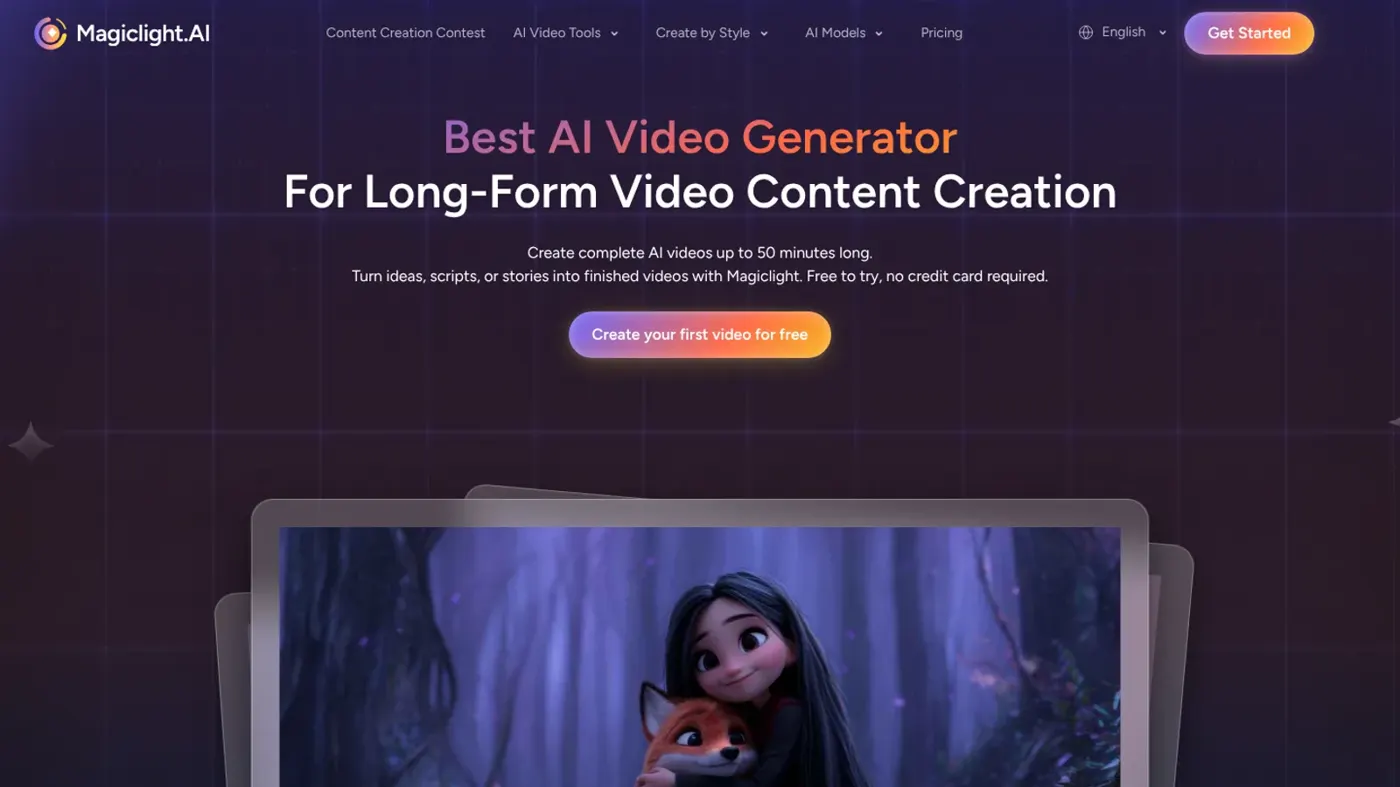
Our verdict on MagicLight (Magic Light AI)
MagicLight is a fast way to turn scripts into long, multi-scene story drafts, and independent testers find it easy to use. Story, kids' and education creators should try it on a small plan first; skip it if you need precise control or predictable costs.
Pricing Free trial; Standard $7.50/mo ($90/yr), Plus $14/mo ($168/yr), Pro $22/mo ($264/yr), Ultra $45/mo ($540/yr), Ultimate $75/mo ($900/yr) billed annually; iOS monthly from $12
Visit MagicLight (Magic Light AI)Here is the short version. Magic Light AI (officially MagicLight, at magiclight.ai) is a web and mobile AI video generator that turns a story, script or idea into a multi-scene video with recurring characters, voiceover, lip sync, music and subtitles, at lengths up to 50 minutes. You can start free without a card, and paid plans begin at $7.50 a month billed annually. It is good at fast first drafts of long story videos; it is weak on predictable credit costs, fine control and customer support.
Nobody on our team ran MagicLight hands-on for this review, so there are no screenshots or stopwatch numbers from us here. Instead we compared MagicLight using its official pricing and product pages, published independent tests, two recent YouTube reviews and about 50 user reviews, as of late October 2026. Where someone else did the testing, we say who.
Magic Light AI at a glance
| Item | Summary |
|---|---|
| Our rating | 3.5 / 5 (research-based, not hands-on) |
| Best for | Story channels, kids' animations, educators and faceless YouTube creators who want long drafts fast |
| Free plan | Yes, limited credits, no card required |
| Paid from | $7.50/month billed annually ($90/year), or $12/month monthly on iOS |
| Platforms | Web, iOS, Android |
| Website | magiclight.ai |
A quick naming note: "Magic Light AI" is not the same as MagicSchool, the AI platform for teachers. If you searched for the MagicSchool AI logo or lesson tools, see our MagicSchool AI review. There is also an older photo-editing plug-in called Magic Light from Skylum, which shows up in some YouTube results; it is unrelated.
What is Magic Light AI?
Think of MagicLight as a pipeline, not a single model. You give it text, and it runs a chain of steps: a language model writes or splits the script into scenes, an image model designs characters and keyframes, a video model animates each scene, and audio tools add narration, lip sync, music and captions. MagicLight's own product page describes Story to Video as a tool that “turns full scripts into structured multi-scene productions”, with scripts of up to 12,000 characters and durations up to 50 minutes.
The important consequence of that design: MagicLight does not train one big video model of its own. It routes your project to third-party models. The current pricing page lists Seedance 2.5, Seedance 2.0, Nano Banana 2, GPT 5.5 and Minimax-H3 across all plans, while independent reviews from earlier in 2026 also list Kling, Veo, Sora 2 and Hailuo options. Model choice drives both quality and credit cost, which matters a lot later in this review.
The company behind the iOS app is listed as MAGICLIGHT(HK)LIMITED. Signing up is a standard email or social login on the website or app; the pricing FAQ says you “can start creating AI story videos for free with limited credits, no card required.”
Key features
Since we did not test the product ourselves, this section is based on MagicLight's documentation and the independent tests cited below.
Story to Video and long video generation
This is the core feature. You paste a story or script, pick a visual style and let MagicLight build a storyboard you can review before final rendering. Pollo AI's reviewer, who tested four workflows (a short animated story, a lesson-style explainer, a vertical social video and a simple product story), found it unusually easy to start and liked that the storyboard step lets you check scenes before spending more credits.
Consistent characters
You can create a character once from a prompt or an uploaded image and reuse it across scenes. MagicLight's Nano scene editing lets you adjust clothing, expressions, body type and up to 50 poses before a scene renders. Consistency is the headline promise, and it is also the most common complaint: both Pollo AI and SoftwareTestingHelp report characters and props drifting between scenes, such as clothing changes.
Kids Story Video and Music Video modes
Kids Story Video targets short animated children's stories up to 10 minutes, with 37 voiceovers, background music and subtitles. The Music Video Generator creates songs by genre and builds a storyboard around them.
Voice, lip sync and subtitles
Narration, voice cloning, lip sync and subtitles are built in. SoftwareTestingHelp lists subtitles in 30+ languages and notes that lip sync is not included in the free trial.
Image to video and the image studio
MagicLight also animates still images and has an image studio for scenes and characters, as the App Store listing describes. Each plan caps image-to-video separately, from 290 seconds on Standard to 10,000 seconds on Ultimate. For standalone image work, a dedicated AI image generator gives you more control.
What it does not do: motion capture
If you came here looking for AI motion capture from video (filming yourself and transferring the movement to a character), MagicLight's documentation does not list that feature. Tools like Viggle AI are built for that job.
MagicLight AI pricing and plans
MagicLight uses credits. Every generation step (characters, keyframes, animation, voice) spends credits, and stronger models spend more. Here is the official web pricing, checked October 2026, with the yearly 50% discount the page labels as limited time:
| Plan | Annual price | Per month (annual) | Credits/month | Advertised video | Image-to-video |
|---|---|---|---|---|---|
| Free | $0 | $0 | Limited, amount not stated | Trial | Trial |
| Standard | $90 | $7.50 | 8,000 | Up to 130 min | Up to 290 s |
| Plus | $168 | $14 | 27,000 | Up to 450 min | Up to 960 s |
| Pro | $264 | $22 | 47,000 | Up to 780 min | Up to 1,680 s |
| Ultra | $540 | $45 | 150,000 | Up to 2,500 min | Up to 5,360 s |
| Ultimate | $900 | $75 | 280,000 | Up to 4,670 min | Up to 10,000 s |
Source: MagicLight pricing page, checked October 2026. Paid plans include 1080p export, no watermark and a general commercial licence; Pro and above get 20% off foundational models, and Ultra and Ultimate add VIP-speed generation. The page shows struck-through prices of $15, $28, $44, $90 and $150 a month next to the annual rates.
On iOS, monthly billing is listed at $12 for Standard, $26 for Plus and $35 for Pro, with credit top-ups of 10,000 credits for $18, 30,000 for $50 and 60,000 for $88.
One caution: MagicLight's credit allowances have changed several times this year. Its own product page from mid-2026 listed 6,000 credits on Standard and 35,000 on Pro, and an August 2026 breakdown showed 7,000 and 45,000. Check the pricing page on the day you buy.
Is Magic Light AI free? What the free plan really includes
Yes, but think of it as a trial, not a free tier you can work in. Published descriptions of the free plan list one character creation, two image regenerations and one dynamic conversion. SoftwareTestingHelp found the free trial adds a watermark, caps output at 720p and leaves out lip sync. A third-party app listing mentions a free 6-minute HD export for new users, but we could not confirm that on MagicLight's current pricing page.
Users frequently say the free credits run out before a test video finishes. One reviewer on There's An AI For That wrote that users “cannot test video quality, timing, or overall results before paying.” If you want to try more tools before paying, see our list of free AI video generators.
A worked example: what a minute really costs
Take Standard on annual billing: $7.50 a month for 8,000 credits and "up to 130 minutes". At the advertised ceiling, that is about 62 credits and $0.058 per minute of video. But "up to" assumes the cheapest settings. As an illustration, if your chosen model and regenerations use three times the credits of that baseline, the same plan gives you about 43 minutes, and each minute costs about $0.17.
The gap is real for some buyers. One Trustpilot reviewer wrote: “I bought 17k credits because they advertise around 600 minutes of video.” The review is one star. Budget for the advertised minutes as a best case, not a forecast.
Performance and independent testing
Two independent written reviews did hands-on work, and their results line up.
- SoftwareTestingHelp (updated July 2026) rated MagicLight 4/5 overall, with 5/5 for features and ease of use but 3/5 for the free trial. The author described paid exports as smooth, multi-scene 1080p video and wrote that “This user-friendly platform has made video creation effortless.” The same review flags fast credit drain and slow support.
- Pollo AI (updated October 2026) tested four workflows and concluded the output is a good first draft but not a finished video without human review. Its cons list: less precise than a shot-level editor, unpredictable credit costs on long projects, character drift, and audio timing and pronunciation that need checking. Note that Pollo AI sells a competing video tool, so read its verdict with that in mind: “MagicLight AI is worth trying if you need a beginner-friendly AI video generator for long-form stories”.
We watched for recent independent YouTube reviews. Two from June 2026 cover the current product: one by the Digital Nexus channel and one by CREATIVES SUMAN. Both have modest view counts (about 3,500 and 600 when we checked), and the Digital Nexus description carries a MagicLight referral sign-up link, so treat them as walkthroughs rather than neutral tests.
User ratings are split. On Trustpilot, MagicLight has a TrustScore of 2.7 out of 5 from 115 reviews, with 62% one-star and 23% five-star. The App Store shows a much higher 4.6 from 130 ratings, and There's An AI For That shows 4.1 from 205 ratings. Capterra lists the product but had no user reviews when we checked.
We read about 50 recent comments from those sites. A recurring pattern: positive reviews praise the ease of use and speed, and negative ones focus on money. One positive Trustpilot reviewer wrote that “MagicLight is simple to use and the workflow is clear.” A negative one wrote: “The customer support is horrible.” We also noticed that a cluster of recent five-star Trustpilot reviews read like feature lists, so we weighted the overall star distribution as well as the latest page.
Where it breaks
- Credits vs. minutes. Advertised minutes assume light settings. Premium models, regenerations and lip sync all cost more.
- Character drift. Clothing, props and faces can change between scenes, which is the exact thing the product promises to fix.
- Prompt adherence. A paying user on There's An AI For That wrote that “The resulting video did not follow the prompt at ALL.”
- Scene-by-scene cost. One Trustpilot reviewer complained that you pay “for each scene”, which surprises people expecting one price per video.
- Billing and support. This is the biggest risk. Trustpilot reviewers describe hard-to-find cancellation and unexpected charges, and an App Store reviewer said “they tried to charge me for a whole year” after choosing monthly.
Who it's for
| You are... | Fit | Why |
|---|---|---|
| A story or kids' channel creator | Good | Long multi-scene videos with recurring characters, fast |
| A teacher making explainer stories | Good | Storyboard, narration and subtitles in one place |
| A marketer needing exact brand shots | Weak | Limited shot-level control; details drift |
| A filmmaker wanting precise edits | Weak | Better as a draft tool than a final editor |
| Someone on a strict budget | Risky | Credit costs are hard to predict; start small |
Magic Light AI alternatives worth considering
- Viggle AI: if you want to drive a character's movement from your own video (AI motion capture from video), rather than generate a story from text.
- HeyGen: if you need talking avatars and presenter-style videos instead of animated stories.
- Sora: if you care most about raw clip quality and are happy to assemble scenes yourself.
For a wider comparison, see our guide to the best AI video generators.
Verdict: who should use it and who should skip it
MagicLight solves a real problem well: getting from a script to a long, watchable, multi-scene draft without animation skills. Independent testers agree that it is easy to start and that the drafts are usable. The weak points are just as consistent: credits that buy fewer minutes than advertised, characters that drift, and a billing and support record that drags its Trustpilot score down to 2.7.
Use it if you make story-driven content and are willing to edit the output. Skip it if you need exact control or cannot afford surprises on your card. Either way, start with the free trial or the smallest monthly plan, run one complete project, and only then consider an annual plan.
FAQ
What is Magic Light AI?
Magic Light AI, or MagicLight, is an AI video generator that turns stories, scripts or ideas into multi-scene videos with consistent characters, narration, lip sync, music and subtitles. It supports videos up to 50 minutes and runs on the web, iOS and Android, using third-party models such as Seedance and GPT for each step.
Is Magic Light AI free?
You can sign up and start for free with limited credits and no credit card. In practice the free plan is a trial: independent testers report a watermark, 720p output and no lip sync, and many users say the credits run out before a full test video finishes. Paid plans start at $7.50 a month billed annually.
How much does MagicLight AI cost?
As of October 2026, annual plans cost $90 (Standard), $168 (Plus), $264 (Pro), $540 (Ultra) and $900 (Ultimate) a year. On iOS, monthly plans are listed at $12 for Standard and $35 for Pro. Credit allowances have changed several times in 2026, so check the pricing page before buying.
How do I sign up for Magic Light AI?
Go to magiclight.ai or download the MagicLight app on iOS or Android, then create an account with email or a social login. No card is needed for the free trial. If you later subscribe, note whether you picked monthly or annual billing and how to cancel, since billing confusion is a common complaint.
Is Magic Light AI safe and legit?
It is a real product with paying users and working exports, according to independent reviews. The concerns are commercial, not technical: Trustpilot reviews describe unexpected charges, difficult cancellation and slow support. Start with a small plan, keep your receipts and check the terms before committing to annual billing.
What video reviewers say
“MagicLight AI Review 2026 – Is This AI Video Generator Actually Worth Using?”
— Digital Nexus ·
“Is MagicLight AI the best AI video generator for creators?”
— CREATIVES SUMAN ·
Videos load from YouTube only when you press play.
Ratings around the web
Ratings as of 28 Oct 2026. Scores change over time; follow the links for the latest.
What users are saying
We read about 50 recent user comments: roughly 40 Trustpilot reviews (April to August 2026), App Store reviews and comments on There's An AI For That. The latest Trustpilot page skews positive, but several five-star reviews read like feature lists and the overall distribution is 62% one-star, so we weighted our estimate toward the full picture. Praise centres on ease of use; complaints centre on credits, billing and support.
Common praise
- Easy to use, with a clear workflow
- Quick long-form drafts without editing skills
- Character consistency improving with updates
Common complaints
- Credits run out fast and buy fewer minutes than advertised
- Hard-to-cancel subscriptions and unexpected charges
- Slow or missing customer support
Based on: Trustpilot reviews of MagicLight (page 2), Trustpilot reviews of MagicLight (Sweden), MagicLight on the App Store, MagicLight comments on There's An AI For That
What we like
- Turns a script into a long multi-scene video, up to 50 minutes
- Reusable characters, narration, lip sync, music and subtitles in one workflow
- Beginner-friendly storyboard step before final rendering
- 1080p, no watermark and commercial licence on all paid plans
- Cheap entry on annual billing
What could be better
- Credits often buy far fewer minutes than advertised
- Characters and props can drift between scenes
- Free plan is a short trial with watermark and 720p output
- Frequent complaints about billing, cancellation and support
- Limited shot-level control
Sources
- MagicLight Pricing (MagicLight)
- Magiclight AI Reviews and features (MagicLight Academy)
- MagicLight: AI Video generator (Apple App Store)
- MagicLight reviews, page 2 (Trustpilot)
- MagicLight reviews (Trustpilot Sweden)
- MagicLight AI Long Video Maker Review And Alternatives (SoftwareTestingHelp)
- MagicLight AI Review (Pollo AI)
- MagicLight AI Pricing Explained: Plans, Credits & Which One Is Worth It? (Vijay Talks AI)
- MagicLight ratings and comments (There's An AI For That)
- Magiclight AI (Capterra)
- MagicLight: AI Long Video Maker on PC (BlueStacks)
- MagicLight AI Review 2026 (Digital Nexus, YouTube)
- MagicLight AI Review: Is This the Best AI Video Generator for Creators? (CREATIVES SUMAN, YouTube)
- Skylum Magic Light video (Phillip Glombik, YouTube)