Best open source AI tools in 2026: 8 picks for every budget
The best open source AI tools and models in 2026, from Ollama and Jan to Qwen, DeepSeek and FLUX.2, with licenses, prices and who each one suits.
 Written byRahis SaifiCo-founder and news editor
Why you can trust The AI Future
Our writers research every product, link each claim to its source and correct mistakes openly. Companies can't pay for coverage or see reviews before they're published.
Read our editorial policy
Short answer: most people should start with Ollama. It is free, it runs open models on your own computer, and nearly every other open source AI tool can plug into it. Add Open WebUI if you want a ChatGPT-style interface for a team, or Jan if you want a desktop app that works offline with almost no setup.
Open source AI means AI software or models whose code, and ideally weights, you can download, run, study and modify yourself. In practice, most of what people call open source AI is "open-weight": you get the trained model files, but not always the training data or a fully permissive license. That difference matters when you build a product on top of it.
This guide covers the eight best open source AI tools and models in 2026: three apps that run models and five model families worth running. Every price below was checked against current sources in October 2026. If you want the deeper background on the models themselves, read our complete guide to open source AI models.
Key takeaways
- Local open source AI costs nothing to run. Ollama, Open WebUI and Jan are free. You pay only for your hardware and electricity.
- Open models are now close to the frontier. Early 2026 benchmarks put Qwen 3.5 and Kimi K2.5 within a few points of top closed models on several tests, according to Let's Data Science.
- Read the license, not the label. Qwen, Mistral Large 3 and DeepSeek R1 ship under permissive licenses. Open WebUI, Llama and Gemma add their own terms.
- Cloud options exist when your laptop runs out of power. Ollama's Pro plan is $20 a month, and DeepSeek's API starts at cents per million tokens.
How we ranked them
Nobody at The AI Future ran hands-on tests or took screenshots for this roundup. We compared each tool using official documentation and pricing pages, published independent reviews and benchmark write-ups, as of late October 2026. We ranked them on six criteria:
- Openness: how permissive the license is and whether the weights or code are genuinely downloadable.
- Ease of setup: how quickly a non-specialist can get a working result.
- Capability: model quality, based on published benchmarks and independent rankings.
- Cost: what you pay to run it locally or in the cloud.
- Ecosystem: how well it connects to other tools, APIs and model libraries.
- Privacy and risk: where your data goes and any legal or procurement caveats.
Apps rank above models because you need one to use the other. Prices are in US dollars and can change. Always check the vendor's page before you commit.
Our top open source AI picks at a glance
| # | Tool | Category | Best for | Free tier | Starts at |
|---|---|---|---|---|---|
| 1 | Ollama | Local model runner | Running models on your own computer | Yes | $20/mo |
| 2 | Open WebUI | Self-hosted chat interface | A private ChatGPT for your team | Yes | Free |
| 3 | Jan | Desktop chat app | Offline chat with no server | Yes | Free |
| 4 | DeepSeek | Open-weight model and chat | Free reasoning and a cheap API | Yes | Free |
| 5 | Qwen | Open-weight model family | Building products on Apache 2.0 | Yes | Free |
| 6 | Mistral | Open-weight model and chat | European models with a polished app | Yes | $14.99/mo |
| 7 | Kimi | Open-weight model family | Coding and agent work | Yes | Free |
| 8 | FLUX.2 | Open-weight image model | Open source AI image generation | Yes | $0.03/image |
Notes: Ollama is free locally; $20 a month is its cloud Pro plan. "Free" for the model families means the open weights are free to download and run on your own hardware. Hosted APIs bill per token or per image. FLUX.2's price is the low end of third-party API rates.
The best open source AI tools in 2026, ranked
Ollama – best for running models on your own computer
Ollama is a free, open source runtime that downloads and runs open models on Mac, Windows and Linux with a single command, then serves them to other apps.

Why it stands out
Ollama has become the default way to run open source AI locally. Developer Danilo Falcão da Silva counts more than 169,000 GitHub stars, about 52 million monthly downloads in the first quarter of 2026 and more than 4,500 models in its library. His verdict is telling: "The point isn't that Ollama is the most exciting tool in this space." It is the boring, reliable standard, and that is exactly why it ranks first.
The catch is speed and polish. The same write-up says raw llama.cpp can be 5 to 25% faster on identical hardware, and Ollama is command-line first. If you want a full desktop interface, pair it with Open WebUI or Jan. When your machine cannot handle a large model, Ollama Cloud runs it for you. On August 31, Ollama moved its paid plans to per-token pricing with a monthly pool of usage credits.
Key features
- One-line installs: pull and run models such as Qwen, Gemma or DeepSeek from a public library.
- OpenAI-compatible API: a local server on port 11434 that other tools can call, per Kunal Ganglani's comparison.
- Modelfiles: set a system prompt, context window and sampling settings per model.
- Structured outputs and tool calls: JSON Schema validation and streaming tool calls.
- Cloud models: large open models such as GLM-5.2, Kimi K2.7 Code and DeepSeek V4 Pro, according to WebReactiva.
Pros
- Free and open source for local use
- Huge model library and community
- Works as a back end for dozens of other apps
- Cloud plans if you outgrow your hardware
Cons
- Command-line first, so beginners need a separate interface
- Not the fastest engine for high-volume production use
- Cloud usage credits take some planning
Ollama pricing: Free locally → cloud Pro $20/month (includes $60 of usage), Max $100/month and Team $500/month (checked October 2026). See pricing
Related: Best AI like ChatGPT
Verdict: if you install only one open source AI tool, install this one.
Open WebUI – best for a private ChatGPT for your team
Open WebUI is a self-hosted chat interface that puts a ChatGPT-style app in front of Ollama or any OpenAI-compatible API, with user accounts, document chat and plugins.

Why it stands out
PromptQuorum's review puts it plainly: "Use Open WebUI if you want a self-hosted, multi-user, ChatGPT-style interface in front of Ollama or any OpenAI-compatible API." The review highlights document chat with selectable vector databases, admin and user roles, and a plugin system for tools and custom retrieval. It reports more than 150,000 GitHub stars.
There is an important licensing caveat. Since version 0.6.6 in May 2025, Open WebUI uses its own license, which WZ-IT explains combines BSD-3 with a branding clause. You can remove its branding only for up to 50 users in a rolling 30-day period, with written permission or with a paid enterprise license. The vendor says it is not OSI compliant, so treat it as source-available rather than strictly open source.
Key features
- Multi-user accounts: admin, user and pending roles for teams.
- Document chat: built-in retrieval over your own files.
- Pipelines and functions: add filters, tool calls and custom workflows.
- Any back end: Ollama, vLLM, llama.cpp, LiteLLM or cloud APIs.
- Voice, image and web search: integrations for richer chats.
Pros
- Free for internal use with original branding
- Feels familiar to anyone who has used ChatGPT
- Keeps company data on your own servers
Cons
- You must run and patch a server yourself
- License is not OSI-approved
- Community support only unless you pay for enterprise
Open WebUI pricing: Free to self-host → enterprise license priced on quote (checked October 2026). See license details
Related: Best AI like ChatGPT
Verdict: the best way to give a small team private AI chat, as long as someone owns the server.
Jan – best for offline chat with no server
Jan is a free desktop app for Mac, Windows and Linux that runs AI models offline through a built-in llama.cpp engine, and can also connect to cloud models with your own API keys.
Why it stands out
PromptQuorum describes Jan as "a free, open-source desktop app that runs AI models offline through a built-in llama.cpp engine". That is the whole appeal. You download it, pick a model from its hub or Hugging Face, and start chatting without installing a separate runtime. On Apple Silicon it can also use MLX.
Jan is also a handy hub. It connects to OpenAI, Anthropic, Gemini, Groq, Mistral and OpenRouter with your keys, supports MCP tools, and can expose a local OpenAI-compatible server on port 1337. The trade-off is scope: it is a single-user app with no team tier, and document Q&A is not its focus. Its license is Apache 2.0 with an added attribution request, so GitHub lists it as "Other".
Key features
- Built-in engine: no separate Ollama install needed.
- Model hub: curated downloads plus direct Hugging Face access.
- Cloud connectors: mix local and paid models in one app.
- MCP support: connect external tools and custom assistants.
- Local API server: lets other apps use your local models.
Pros
- Completely free, with no subscription
- Easiest route to offline, private chat
- Runs on all three desktop platforms
Cons
- Single user only
- Support through GitHub and Discord, not a commercial SLA
- Large models still need strong hardware
Jan pricing: Free, no paid plan; cloud providers bill you directly for API use (checked October 2026). See details
Related: Best AI like ChatGPT
Verdict: pick Jan if you want private AI on your laptop this afternoon.
DeepSeek – best for free reasoning and a cheap API
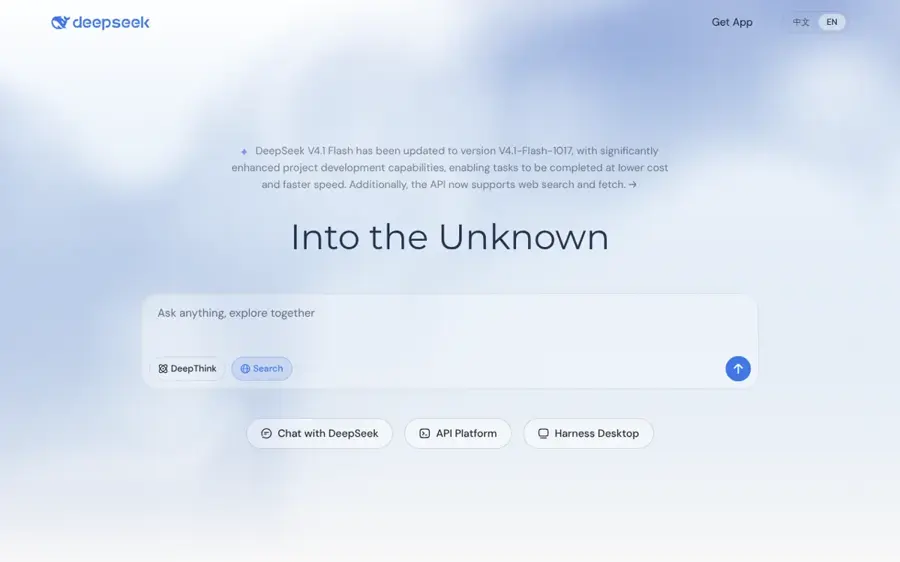
DeepSeek is a Chinese AI lab that releases openly licensed model weights and runs a free chatbot at chat.deepseek.com.
Why it stands out
DeepSeek made open-weight AI mainstream when R1 arrived in January 2025 under the MIT license. Let's Data Science notes the company reported about $5.6 million for the final V3 training run, a fraction of what US labs spend. Its current models are V4-Flash and V4-Pro. The chat app is free, and Krater says "DeepSeek chat is completely free with no subscription", though busy periods can trigger "Server Busy" throttling. WebReactiva rates V4 Pro A- for reasoning with a 1M-token context window.
The risk is political, not technical. On October 20, the US Department of Homeland Security ordered DeepSeek products removed from federal civilian agencies, including third-party products built on DeepSeek. Our news report on the DHS order explains why that matters for vendors. If you sell to the US government, avoid it. If you only want the weights, running them yourself keeps your data off DeepSeek's servers.
Key features
- Two tiers: V4-Flash for budget work, V4-Pro as the flagship.
- Free chat: web and mobile, no paid plans.
- Low API prices: roughly $0.15 per million input tokens for V4-Flash off-peak.
- Long context: up to 1M tokens on V4 Pro.
Pros
- Strong reasoning for free
- One of the cheapest APIs around
- Weights can run locally or through Ollama Cloud
Cons
- Banned across US federal civilian agencies
- The hosted app stores data in China
- Peak-hour throttling on the free app
DeepSeek pricing: Free chat → API from about $0.15 per million input tokens (V4-Flash, off-peak; checked October 2026). See pricing
Related: DHS DeepSeek ban explained Best AI like ChatGPT
Verdict: unbeatable value, but check your compliance rules before you build on it.
Qwen – best for building products on Apache 2.0
Qwen is Alibaba's family of open-weight language models, released under the permissive Apache 2.0 license in sizes from laptop-friendly to data-center scale.
Why it stands out
Qwen 3.5 arrived on February 16, 2026, with a flagship that has 397 billion total parameters and 17 billion active per token. In benchmarks compiled by Let's Data Science, Qwen3.5-397B scored 88.4 on GPQA Diamond, ahead of Claude Opus 4.6 at about 85, and 76.4 on SWE-bench Verified, versus roughly 80 for Opus 4.6. It also scored 92.6 on the IFEval instruction-following test.
The bigger draw for businesses is the license. Apache 2.0 lets you modify and ship Qwen commercially without the custom terms attached to Llama or Gemma. Qwen3.5 and Qwen3-Coder are also available through Ollama Cloud, per WebReactiva, so you can try the large versions before buying GPUs. Like DeepSeek, Qwen is Chinese, and our DHS coverage notes it has drawn similar scrutiny in Washington.
Key features
- Apache 2.0 license: commercial use with few strings attached.
- Mixture-of-experts design: large capacity with lower running costs.
- Many sizes: small models for laptops, large ones for servers.
- Qwen3-Coder: a dedicated coding variant.
Pros
- Most permissive license among top open models
- Benchmark results close to closed frontier models
- Easy to run through Ollama
Cons
- The flagship needs serious hardware to self-host
- Possible procurement questions for government work
Qwen pricing: Free open weights → hosted API pricing varies by provider (checked October 2026). See benchmarks and licensing
Verdict: the safest legal bet if you are building a commercial product on an open model.
Mistral – best for European models with a polished app
Mistral AI is a French lab that publishes open-weight models and runs Le Chat, a consumer assistant at chat.mistral.ai.
Why it stands out
Mistral gives you both halves of open source AI: weights you can self-host and a finished app for everyday use. Mistral Large 3, released in December 2025, is a 675-billion-parameter mixture-of-experts model with 41 billion active parameters, a 256K context window and an Apache 2.0 license, according to Let's Data Science.
Le Chat is cheaper than most Western assistants. Krater lists a free tier, Pro at $14.99 a month and Team at $24.99 per seat. For European organizations that care about where their AI vendor sits, Mistral is the natural first call. We found no independent consumer rating for Le Chat that we could verify, so weigh it on the license and price.
Key features
- Mistral Large 3: flagship open-weight model under Apache 2.0.
- Le Chat: web and mobile assistant with a free tier.
- Team workspace: admin tools, shared usage and central billing.
- Long context: 256K tokens on Large 3.
Pros
- Permissive license on its flagship
- Cheaper paid plan than ChatGPT or Claude
- EU-based vendor
Cons
- Exact Le Chat usage limits are not published clearly
- Smaller ecosystem than US rivals
Mistral pricing: Free → Le Chat Pro from $14.99/month, Team $24.99/seat/month (checked October 2026). See pricing
Related: Best AI like ChatGPT
Verdict: the best pick if you want open weights and a consumer app from the same company.
Kimi – best for coding and agent work
Kimi is Moonshot AI's family of large open-weight models, built for long, multi-step tasks such as coding and agents.
Why it stands out
Kimi K2.5 has 1 trillion total parameters, 32 billion active and multimodal input. In early 2026 figures compiled by Let's Data Science, it led open models with 92.0 on MMLU, 99.0 on HumanEval and a Chatbot Arena Elo of 1447. Cursor even built its Composer 2 coding model on the Kimi K2.5 base, as we cover in our Cursor review.
The newer Kimi K2.7 Code earns a top tier in WebReactiva's ranking of Ollama Cloud models, which says it uses about 30% fewer reasoning tokens than K2.6 and has a 256K context window. The full model is far too large for a laptop, so most people will use it through a cloud host. Check the license on the model card before shipping it in a product; the sources we read did not state it.
Key features
- Trillion-parameter scale: with only 32 billion active per token.
- Coding variant: K2.7 Code for agents and software work.
- Multimodal input: handles images as well as text.
- Cloud access: available through Ollama Cloud.
Pros
- Among the strongest open models for code
- Proven as a base for commercial products
- More efficient reasoning in the latest version
Cons
- Needs data-center hardware to self-host
- License terms need checking
- Chinese origin may raise compliance questions
Kimi pricing: Free open weights → cloud use through hosts such as Ollama Cloud from $20/month (checked October 2026). See Ollama Cloud pricing
Related: Cursor review
Verdict: choose Kimi when coding quality matters more than running on your own machine.
FLUX.2 – best for open source AI image generation
FLUX.2 is a family of image models from Germany's Black Forest Labs, with open-weight versions you can run on your own GPU.
Why it stands out
If you searched for an AI image generator that is open source, this is the answer. Black Forest Labs was founded by former Stability AI staff, the team behind Stable Diffusion. Zapier calls FLUX "the premier open text-to-image models" and says that "if you're looking to get into open AI image generation", you should start experimenting with it. Dupple calls FLUX.2 "the photorealism leader of 2026".
FLUX.2 Pro and Max are hosted only. FLUX.2 Dev is a 32-billion-parameter open model, and Klein is a compact series for fast local generation. There is no consumer app from Black Forest Labs, so most people use FLUX inside other tools or a node-based interface. Licenses differ by model, and Zapier warns you to check them.
Key features
- Open weights: Dev and Klein run locally for free.
- Multi-reference editing: consistent variations of one subject.
- Wide availability: APIs, Cloudflare Workers AI and third-party apps.
- Prompt-based editing: change images with plain text.
Pros
- Top-tier photorealism with open weights
- Free to run on your own GPU
- Cheap API rates
Cons
- No official consumer app
- License terms vary between versions
- Local use needs a capable graphics card
FLUX.2 pricing: Free to self-host the open weights → about $0.03 to $0.06 per image through APIs (checked October 2026). See pricing
Related: Best AI image generators
Verdict: the clear pick for open image generation if you are comfortable with some setup.
How to choose the right open source AI tools
Start with your hardware
Your computer decides what you can run. Small and mid-size models work on a modern laptop, especially Apple Silicon Macs. Flagships like Qwen3.5-397B, Kimi or DeepSeek V4 Pro need data-center GPUs, so you will use them through a cloud host instead. Quantized versions help: Let's Data Science says Q4_K_M quantization keeps about 92% of original quality.
Pick an app before a model
Choose Ollama if you are comfortable with a terminal or want other apps to use your models. Choose Jan if you want a desktop app and nothing else. Choose Open WebUI if more than one person needs access. You can switch models any time; switching apps is more work.
Check the license for your use
For personal use, almost any license is fine. For a commercial product, prefer Apache 2.0 or MIT models such as Qwen, Mistral Large 3 or DeepSeek R1. Llama ships under the Llama Community License and Gemma under its own terms of use, which add conditions.
Think about compliance early
Model origin now matters in procurement. The DHS order against DeepSeek covers products built on it, so if you sell to US government customers, document which base models sit inside your software.
Free vs paid: what you actually get
Here is the honest budget picture. Running open source AI locally is free in licensing terms, but not free in practice. You pay with hardware and time.
| Option | What you pay | What you get |
|---|---|---|
| Local (Ollama, Jan) | $0 plus your hardware | Full privacy, small to mid-size models, offline use |
| Self-hosted for a team (Open WebUI) | Server costs plus admin time | Shared private chat, document search, user roles |
| Ollama Cloud | $20, $100 or $500 a month | Large open models without buying GPUs |
| Hosted APIs | Per token or per image | Pay-as-you-go access, such as DeepSeek or FLUX.2 |
| Consumer apps (Le Chat, DeepSeek) | Free to $14.99 a month | A ready-made assistant, with data on the vendor's servers |
Self-hosting a large model is not always cheaper. In one illustrative workload of 10 million tokens a day, Let's Data Science estimated about $207 a month for Llama 3.3 70B on Groq, against roughly $4,500 a month to rent your own GPUs. Unless you need full control or strict privacy, a hosted API is often the cheaper route.
Final verdict
If you only pick one, pick Ollama. It is free, it runs on any desktop, and it connects to almost everything else on this list. Add Jan if you want a friendlier desktop app, or Open WebUI if your team needs a private ChatGPT.
For models, choose Qwen if you need a clean commercial license, DeepSeek if you want maximum value and have no compliance worries, Mistral if you want a European vendor with a cheap app, and Kimi for heavy coding work. For images, FLUX.2 is the open option to beat. If you would rather not run anything yourself, our list of AI tools like ChatGPT covers the closed alternatives. And if you are curious how all these models actually work, start with our explainer on what LLM AI is.
FAQ
What is open source AI?
Open source AI is AI software or models you can freely use, study, modify and share. The Open Source Initiative's definition expects code, weights and enough training-data detail to rebuild the system. Most popular models are actually "open-weight": you can download and run them, but the training data stays private.
Which AI is open source?
Popular open models include Qwen, DeepSeek, Mistral Large 3, Kimi, Llama, Gemma and FLUX.2 for images. Their licenses differ: Qwen and Mistral Large 3 use Apache 2.0, DeepSeek R1 uses MIT, while Llama and Gemma add custom terms. ChatGPT, Claude and Gemini are not open source.
Which open source AI is best?
For most people, the best setup is Ollama or Jan running a Qwen model, because it is free, private and commercially licensed under Apache 2.0. For coding, Kimi K2.7 Code ranks highly. For images, FLUX.2 leads. The best model depends on your hardware and license needs.
Is open source AI free?
The software and weights are usually free to download and run. You still pay for the hardware, electricity or cloud GPUs to run them. Hosted options cost money: Ollama Cloud starts at $20 a month and DeepSeek's API charges per token. Local apps like Jan and Ollama cost nothing.
Can I run open source AI on my laptop?
Yes. Ollama and Jan run small and mid-size models on most modern laptops, and Apple Silicon Macs handle them especially well. Very large models, such as the biggest Qwen, DeepSeek or Kimi versions, need server GPUs, so you would use a cloud host for those instead.
Sources
- Ollama's transparent pricing (Ollama)
- Ollama in 2026: The Boring Choice for Open-Source LLMs (Danilo Falcão)
- LM Studio vs Ollama 2026: 3 Shifts That Change Everything (Kunal Ganglani)
- Modelos de Ollama Cloud en 2026: GLM-5.2, Kimi K2.7 y MiniMax M3 (WebReactiva)
- Open WebUI License 2026: What the Branding Clause Means for Businesses (WZ-IT)
- Open WebUI review (PromptQuorum)
- Jan review (PromptQuorum)
- Open Source vs Closed LLMs: Choosing the Right Model in 2026 (Let's Data Science)
- DeepSeek pricing (Krater)
- Mistral pricing (Krater)
- US orders DeepSeek removed from federal civilian agencies (The Hacker News)
- The best AI image generators (Zapier)
- Best AI image generators (Dupple)