Read AI review 2026: features, pricing, pros and cons
Read AI is a capable AI meeting notetaker with a useful free plan and $15 Pro tier, but its uninvited-bot reputation means you need to set it up carefully.
 Written byAlap ZahidReviews and guides editor
Why you can trust The AI Future
Our writers research every product, link each claim to its source and correct mistakes openly. Companies can't pay for coverage or see reviews before they're published.
Read our editorial policy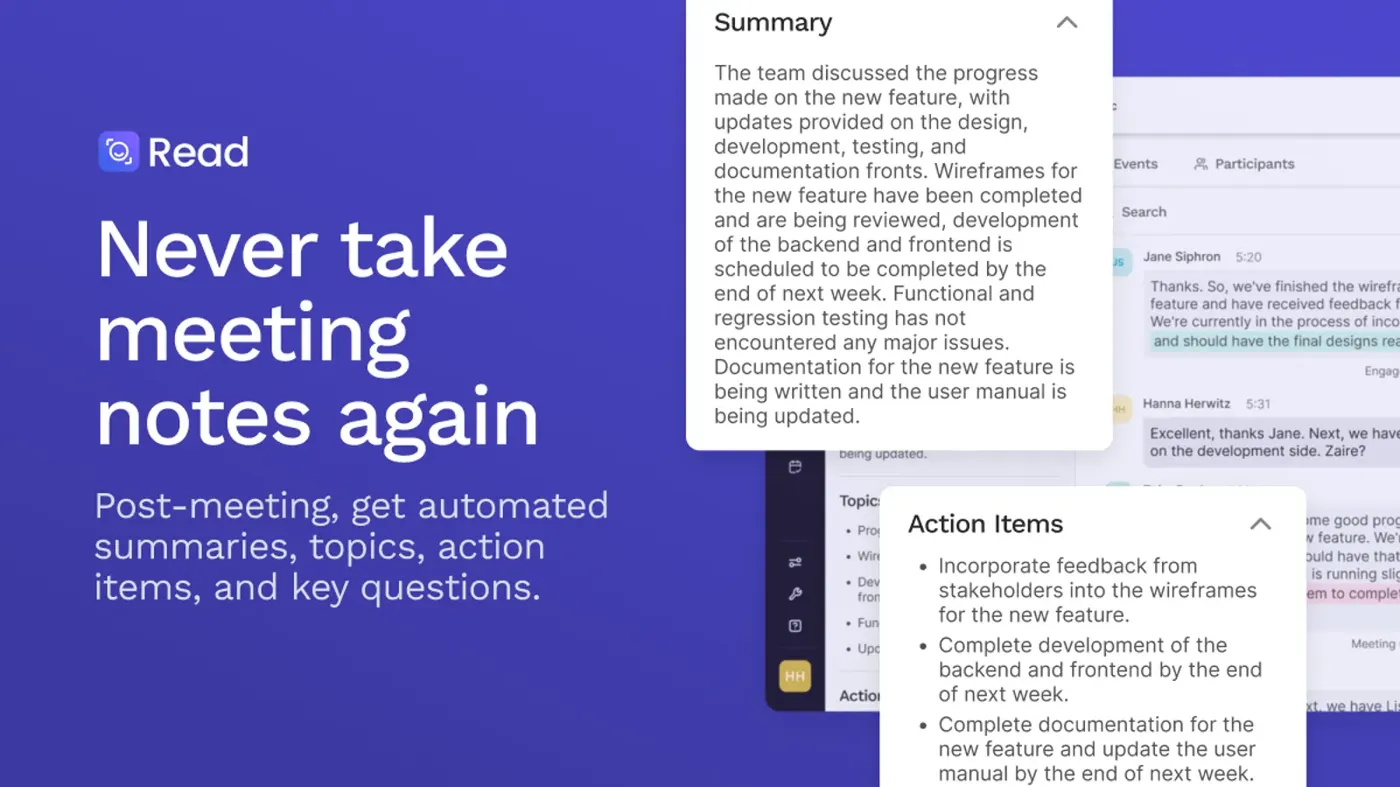
Our verdict on Read AI
Read AI is one of the most complete AI meeting assistants for the money, with a usable free plan, a cheap Pro tier and useful 2026 additions like Ada and botless Google Meet. Busy managers, sales teams and .edu users should try it; skip it if you can't control how notetakers join your meetings.
Pricing Free (5 meetings/mo); Pro $15/user/mo annual ($19.75 monthly); Enterprise $22.50 annual ($29.75 monthly); Enterprise+ $29.75 annual ($39.75 monthly, 5-licence minimum); EDU from $60/yr
Visit Read AIRead AI is an AI meeting assistant that joins your Zoom, Google Meet and Microsoft Teams calls, transcribes them, and sends you a summary with action items. It's free for five meetings a month, and paid plans start at $15 per user per month on annual billing. It's genuinely useful if you live in back-to-back calls, but it has a reputation problem: plenty of people have found its bot turning up in meetings they never invited it to.
I'll be upfront about how this review was put together. Nobody at The AI Future ran a hands-on test of Read AI for this piece, so there are no stopwatch timings or screenshots of my own here. Instead, I've pieced together Read AI as it stands in late October 2026 from the official pricing and help pages, Read AI's own product announcements, independent coverage from TechCrunch and others, G2 ratings and a long trail of user complaint threads. When someone else did the testing or the complaining, I'll tell you who.
Short version? Strong features for the price, a decent free plan, and settings you really need to check before you let it loose on your calendar.
What is Read AI?
Read AI is a Seattle company, and its product is what most people mean when they search "read ai meeting notes" or "notetaker ai". You connect your calendar, and Read's assistant joins your scheduled calls, records them and produces a "report": a summary, a transcript, action items and some meeting metrics like talk time and engagement.
It has grown well beyond the meeting room, though. Read now pulls in email, Slack and other connected tools so you can search across everything from one place, and in February 2026 it launched Ada, an email-based assistant that schedules meetings and answers questions for you. CEO David Shim told TechCrunch the company had over 5 million monthly active users and about 50,000 sign-ups a day, and that it has raised more than $81 million in total.
So if you've been wondering "what is Read AI?", the honest answer is: it started as an AI meeting notetaker and is trying to become an AI work assistant that knows everything you've said in meetings, emails and chats.
Key features
Meeting notes, transcripts and summaries
This is the core job, and the one most people pay for. Read joins calls on Zoom, Google Meet and Microsoft Teams, and after the meeting you get a report with a summary, action items and the full transcript. According to the Read AI pricing page, it works in 20+ languages, and summaries are included even on the free plan.
The free plan caps you at five meeting transcripts per month and one hour per meeting. Pro lifts that to unlimited transcripts with a four-hour cap, and Enterprise+ stretches meetings to eight hours.
Botless Google Meet
This is the update I'd have wanted years ago. On March 26, 2026, Read AI introduced a botless integration for Google Meet built on Google's Meet Media API. Instead of a robot attendee sitting in your participant list, Read records through the integration itself. You still click "Start Recording", and participants are notified that the meeting is being measured before recording starts. It's free for all new and existing customers, including free-plan users.
That doesn't apply to Zoom or Teams yet, where a bot still joins, as Layer3 Labs notes in its October 2026 guide.
Ada, the email assistant
Ada is Read's "digital twin", launched in February. You email it, and it can find meeting times by sharing your availability with the other person, answer questions from your company's knowledge base and past meetings, and draft replies for you to approve. TechCrunch reports that Ada is available to all users, that it won't share sensitive information without your permission, and that it works only by email for now, with Slack and Teams support planned.
Shim's framing of setup was simple: "when you are bringing on a new employee, you train them." Fair enough, but it also means Ada is only as good as the meetings and documents you feed it.
Search across meetings, email and Slack
Read's enterprise search lets you ask questions across your meeting history and connected apps. In its March 2026 update, Read upgraded its Slack integration so you can search your full Slack history, including channels, DMs and group chats. Search is unlimited on every plan, including Free, which is unusually generous.
Integrations, MCP and the API
The same March update added automatic saving of meeting notes to Notion and Confluence, plus an MCP server (in open beta) and a REST API. The MCP server lets ChatGPT, Claude and other AI tools read your meeting insights directly. Read's pitch was "No exports. No copy-paste." If you already use Claude or ChatGPT for your work, that's a real time saver.
One catch: Notion, Salesforce, HubSpot, Jira, Confluence, Zapier and webhooks are "premium integrations", so they need at least the Pro plan, according to the pricing page.
Meeting coach and metrics
Every plan includes a "personalized meeting coach" that scores things like talk time and engagement. Some people love this. Others find it a bit much, and it has drawn criticism; eesel's roundup of Read AI reviews cites a user whose casual team chat was flagged "Sentiment POOR". Treat the scores as a rough nudge, not a performance review.
Mobile apps for in-person meetings
Read has iPhone and Android apps that record in-person conversations and produce the same reports. The iPhone help page says the app needs iOS 18 or later and can't record phone calls, FaceTime or virtual meetings, because another app is already using the microphone. Audio and video playback is limited to Enterprise and Enterprise+.
Read AI pricing and plans
Here's what Read AI charges, per user, as listed on the official pricing page and the Read AI help center (checked October 2026):
| Plan | Monthly billing | Annual billing | Highlights |
|---|---|---|---|
| Free | $0 | $0 | 5 transcripts a month, 1-hour cap, summaries, search, coaching |
| Pro | $19.75/mo | $15/mo | Unlimited transcripts, 4-hour cap, premium integrations, 100 upload credits |
| Enterprise | $29.75/mo | $22.50/mo | Audio and video playback, highlights, Claude and GPT models in Ask Read, 200 upload credits |
| Enterprise+ | $39.75/mo | $29.75/mo | 5-licence minimum, HIPAA, SAML and SCIM, custom retention, 8-hour cap |
What the free plan really includes
The free plan is "Always free, no credit card required," and it's more than a teaser. You get summaries, the meeting coach, unlimited search, basic integrations and the desktop and mobile apps. What you don't get is volume: five transcripts a month and a one-hour limit per meeting. There's no audio or video playback and no file uploads either.
If you have one or two calls a week, that may be all you need. If you have five calls on a Monday, you'll hit the ceiling before lunch.
Two more details worth knowing. Layer3 Labs reports that new accounts get an automatic Enterprise trial of unpublished length that drops back to Free without asking for a card. It also lists education plans for verified .edu users at $60 a year (Pro-like) or $100 a year with video features, which is a very good deal if you're a student or teacher. And if your company pays for Zoom's Essential Apps bundle, Read's premium features may already be included.
Performance and independent testing
Because we didn't run our own tests, here's what the independent evidence says.
On G2, Read AI scores 4.0 out of 5 from 43 reviews, with ease of use at 8.4 and quality of support at 7.7. That's respectable, but it's a small sample, and well behind a rival like Fellow, which shows 4.7 from more than 2,400 reviews on the same page. G2's summary says reviewers find Read AI easy to set up but feel it lacks some of Fellow's depth.
The loudest independent evidence, though, isn't about transcript accuracy. It's about how Read spreads. A long Zoom developer forum thread is full of admins and users reporting that Read's bot joined meetings even though they'd never installed or approved it. One admin wrote: "It is not added, and has never been approved in our App Marketplace dashboard." A Zoom staff member explained in the thread that deleting the Read account, not just removing the Zoom app, is what stops the bot, and that if it still turns up, another attendee is probably using Read.
eesel's review roundup collects similar stories, quoting a Reddit user who said "It spreads like a computer worm" and noting that the University of Washington blocked the tool, citing "security and privacy risks to institutional data." Worth noting: eesel sells a competing product, and its roundup dates from late 2025, so take the framing with a pinch of salt. Still, the pattern is consistent enough that you shouldn't ignore it.
The botless Google Meet integration, with its consent notice before recording, is a step in the right direction. My advice: before you connect your calendar, go through the auto-join and sharing settings, and tell people when Read is in the room.
Who Read AI is for
- Sales and customer teams who need CRM updates in HubSpot or Salesforce and searchable call history. Pro or Enterprise makes sense here.
- Managers in lots of meetings who want summaries and action items without taking notes, and who'll use cross-app search to find "what did we decide about X?"
- Students and educators with a .edu address, where the $60-a-year education plan is hard to beat for lecture and group-project notes. If you're studying, our Gauth AI review covers a different kind of study helper.
- Teams already using Claude or ChatGPT, who can plug Read's MCP server in and query meetings from their AI assistant.
Who should skip it? Anyone handling sensitive conversations without admin control over how notetakers join, and anyone who'd rather not have a bot (or a sentiment score) in every call.
Read AI alternatives worth considering
- Granola takes a lighter, botless approach, recording from your device and blending your own notes with AI. Layer3 Labs lists its Business plan at $14 per user per month. Read our Granola AI review.
- Otter is a long-standing transcription pick and one of the best-known names in AI meeting notes. See our Otter AI review for plans and free-plan limits.
- Fellow pairs meeting notes with agendas and team workflows, and has a far larger and better-rated review base on G2.
For more options outside meetings, our roundup of the best AI tools for productivity is a good next stop.
Verdict: who should use Read AI and who should skip it
Read AI does a lot for not much money. The free plan includes summaries and unlimited search, Pro at $15 a month on annual billing is competitive, and the 2026 additions (Ada, botless Google Meet, Slack search, MCP) make it more than a transcript machine. If you want one AI meeting manager that also searches your email and chat, it's one of the most complete options around.
But the trust issue is real. Years of complaints about bots joining uninvited, plus institutional blocks, mean you need to set it up deliberately rather than click "allow all" and forget it. Do that, and Read AI earns its place. Skip it if you can't control who records your meetings, or if a quieter tool like Granola suits how you work.
My score: 3.5 out of 5. Strong features and value, held back by privacy friction and so-so support ratings.
FAQ
What is Read AI?
Read AI is an AI meeting assistant from a Seattle company of the same name. It joins Zoom, Google Meet and Teams calls, records and transcribes them, and sends summaries, action items and meeting metrics. It also searches your email and Slack, and offers an email assistant called Ada. A free plan covers five meetings a month.
What is an AI meeting manager?
An AI meeting manager is software that handles the admin around meetings for you: recording, transcribing, summarising, pulling out action items, and sometimes scheduling and follow-ups. Tools like Read AI, Otter and Granola do this so you can focus on the conversation instead of taking notes, then search what was said later.
Is Read AI free?
Yes, there's a free plan with no credit card required. It includes five meeting transcripts a month with a one-hour limit per meeting, plus summaries, meeting coaching and unlimited search. Paid plans start with Pro at $15 per user per month billed annually, or $19.75 billed monthly.
How do I stop Read AI from joining my meetings?
Turn off auto-join in your Read AI settings, or delete your Read account entirely. A Zoom staff member explained on Zoom's developer forum that removing the Zoom app alone isn't enough. If the bot still appears, another attendee is likely using Read, and your admin may need to block it organisation-wide.
Ratings around the web
Ratings as of 29 Oct 2026. Scores change over time; follow the links for the latest.
What we like
- Free plan includes summaries, meeting coaching and unlimited search
- Pro is competitively priced at $15 per user per month on annual billing
- Botless Google Meet recording with a consent notice, free for all users
- Searches across meetings, email and full Slack history
- MCP server and REST API connect meeting data to Claude and ChatGPT
What could be better
- Long-running complaints about the bot joining meetings uninvited
- Free plan capped at five transcripts a month and one hour per meeting
- Audio and video playback locked to Enterprise plans
- Support scores lag rivals on G2 (7.7 quality of support)
Sources
- Read AI plans and pricing (Read AI)
- What are the different plans that Read offers? (Read AI Help Center)
- Read AI Pricing: Every Plan and What a 10-Seat Team Pays (Layer3 Labs)
- Read AI launches an email-based 'digital twin' to help you with schedules and answers (TechCrunch)
- Read It: What's new at Read AI, March 2026 (Read AI)
- Read AI introduces a botless integration with Google Meet (Read AI)
- Read AI App for iPhone (Read AI Help Center)
- Compare Fellow and Read AI (G2)
- How to get rid of read.ai? (Zoom Developer Forum)
- An honest look at Read AI reviews: Features, flaws, and a better alternative (eesel AI)